The Complete Production Guide to the Emergency PHP Security Updates: Mitigating Critical RCE Vulnerabilities CVE-2026-109618 and CVE-2026-109619
Detailed architectural mechanics, package-by-package Linux upgrade commands, worker process purging, and dangerous mitigation pitfalls for the dual 9.2 CVSS remote code execution flaws.
Published: October 21, 2026 | Read time: ~10 min | Watch Video (Japanese)
Executive Summary: Beyond the “Update Package” Illusion
If your organization operates web applications or enterprise APIs powered by PHP ── including content management systems like WordPress, Laravel frameworks, or legacy internal portals ── immediate infrastructure verification is required.
On October 21, 2026, the PHP Security Team and GitHub Security Advisories published patches for two Critical remote code execution (RCE) vulnerabilities: CVE-2026-109618 and CVE-2026-109619. Both vulnerabilities carry a CVSS v4 base score of 9.2 (Critical).
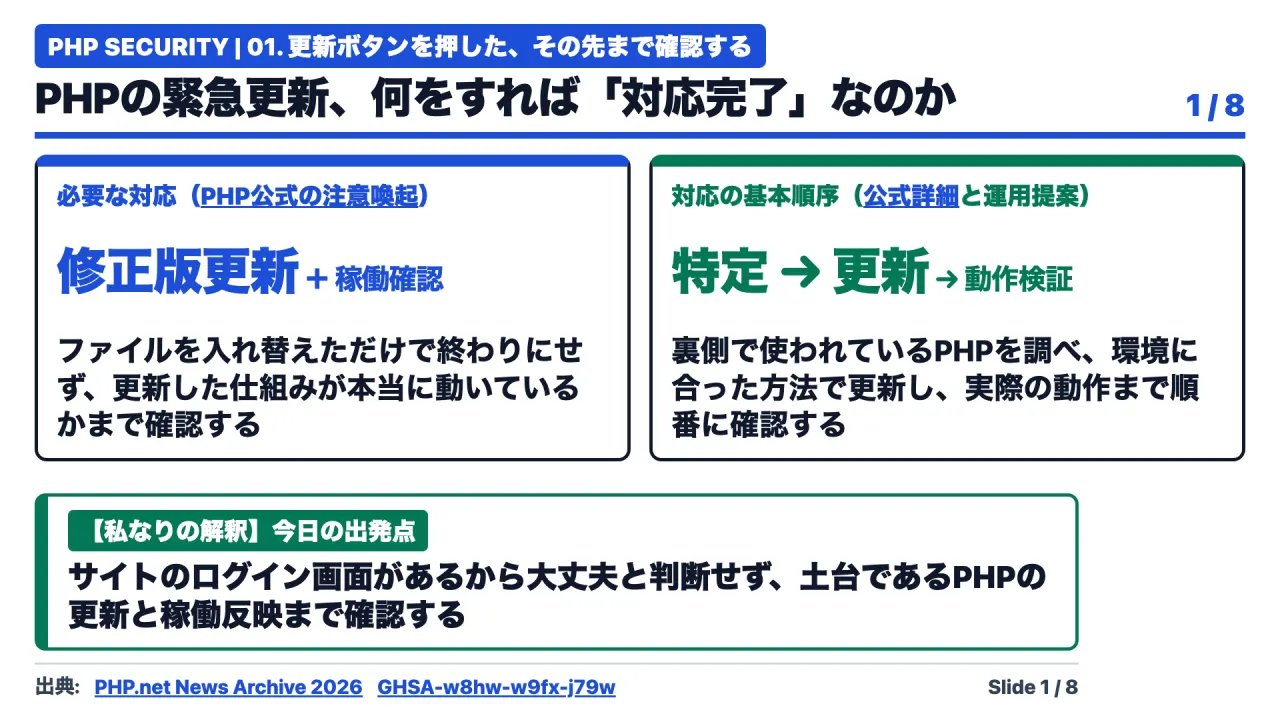
Many enterprise IT administrators assume that executing a package manager update (apt-get upgrade or dnf upgrade) completes the remediation. In production environments, this assumption is hazardous:
- Updating disk binaries leaves active in-memory worker processes running vulnerable code indefinitely.
- The command-line interface (CLI) PHP version frequently differs from web server runtimes (PHP-FPM, Apache
mod_php). - Applying unvetted configuration mitigations (such as setting
memory_limit=-1) can induce severe server crashes or exacerbate memory corruption.
True operational remediation requires four sequential steps:
- Identification: Mapping every web-facing PHP Server Application Programming Interface (SAPI) across production, staging, and containers.
- Preparation: Matching official patches or distribution security backports with verified rollback procedures.
- Execution & Purging: Applying binary updates and restarting web services to terminate all stale worker processes.
- Validation: Testing end-user application workflows while monitoring error logs for operational regressions.
The Anatomy of Dual CVSS 9.2 Critical RCE Vulnerabilities
Both vulnerabilities allow unauthenticated remote attackers to execute arbitrary code on the web server over standard HTTP/HTTPS connections.
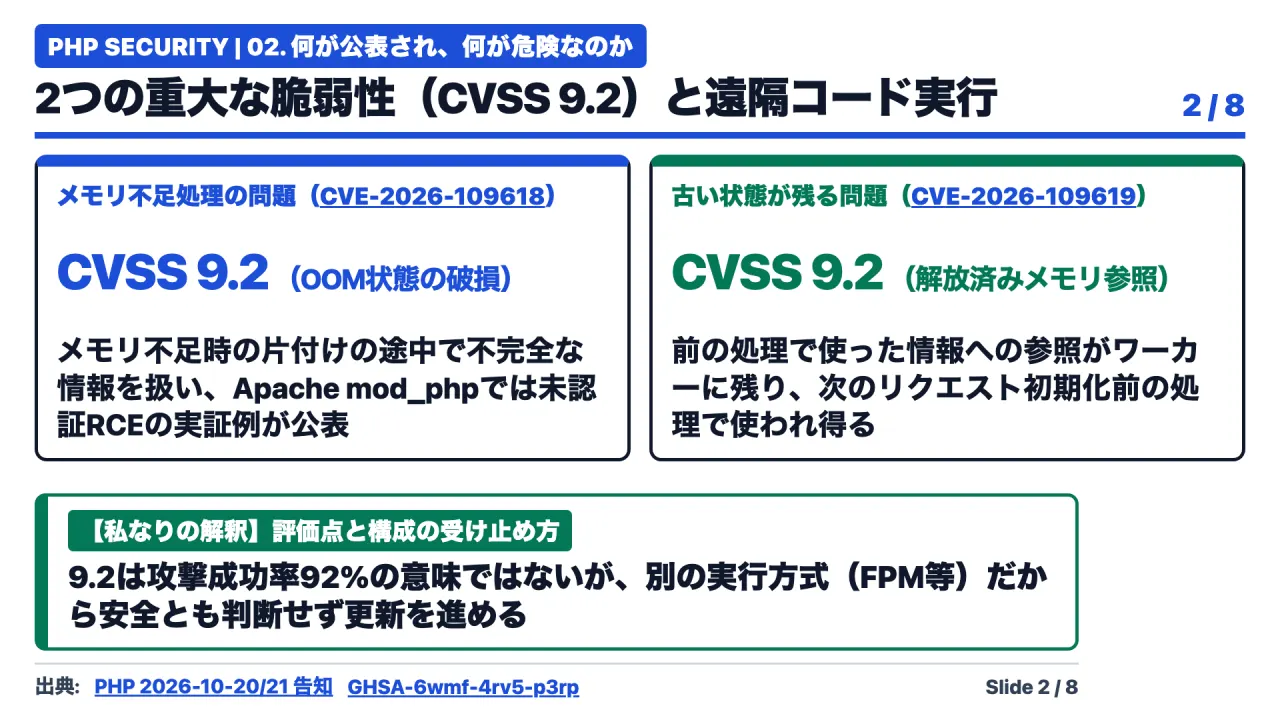
CVE-2026-109618 (GHSA-w8hw-w9fx-j79w): Out-of-Memory (OOM) State Corruption
Historically, when PHP encountered an Out-of-Memory (OOM) condition, it utilized longjmp() to abort active execution and jump directly to request shutdown routines.
However, in specific request parsing contexts, the request memory structure was temporarily marked accessible before its internal pointers were fully initialized. If a memory allocation failed at that exact threshold, the subsequent shutdown routine attempted to clean up uninitialized pointers. This condition resulted in wild memory reads and corrupted execution branches, leading directly to unauthenticated remote code execution.
Crucially, an attacker can trigger this OOM state even when total payload sizes remain well below administrative limits like post_max_size:
- Crafting multipart form submissions without a valid
Content-Lengthheader. - Submitting thousands of distinct headers within a single multipart body.
- Nesting empty file input fields that bypass
max_file_uploadsaccounting.
The official fix eliminates longjmp() during OOM, replacing it with a two-stage mechanism: a delayed soft OOM that halts execution gracefully at a safe virtual machine boundary, and a hard OOM threshold that terminates the process immediately via _exit().
CVE-2026-109619 (GHSA-6wmf-4rv5-p3rp): Cross-Request Stale Global State (Use-After-Free)
The second vulnerability stems from persistent worker processes retaining pointers to memory allocated by a completed request.
This flaw follows a classic Producer-Consumer pattern:
- The Producer: When an initial request terminates abnormally (due to OOM, fatal script errors, or uncaught exceptions), normal global variable resets are skipped. The worker’s global state continues to point to memory addresses that are subsequently freed at the end of the request.
- The Consumer: When the same worker receives a subsequent HTTP request, initialization routines access those stale pointers before the new request’s memory structures are established. This Use-After-Free (UAF) condition enables arbitrary code execution.
Two distinct Consumer vectors were confirmed by security researchers:
- Pre-Initialization INI Diagnostics: Processing invalid INI directives from
.htaccessorPHP_VALUEtriggers internal diagnostic notifications that access stale state before full runtime initialization. - Session Upload Progress (
session.upload_progress): Tracking file upload metrics executes prior to standard session initialization, reading uninitialized memory left by the preceding request. In PHP 8.5, enablingfatal_error_backtracesensures that fatal error backtrace metadata persists across requests into subsequent diagnostic calls.
Impact Across Server Execution Modes (SAPIs)
Every web-facing PHP execution mode is affected:
- Apache
mod_php: Highly vulnerable. Because Apache’s request startup invokes shutdown handlers even upon startup failures, unauthenticated RCE was demonstrated under default configurations before a single line of customer PHP code executed. - PHP-FPM, FrankenPHP, and LiteSpeed: While PHP-FPM terminates child processes upon startup failure, post-startup OOM conditions and upload-progress consumer vectors remain fully exploitable across all persistent worker pools.
Step 1: Mapping the Infrastructure ── Why php -v Is Insufficient
The first operational task is cataloging every PHP runtime across the enterprise.
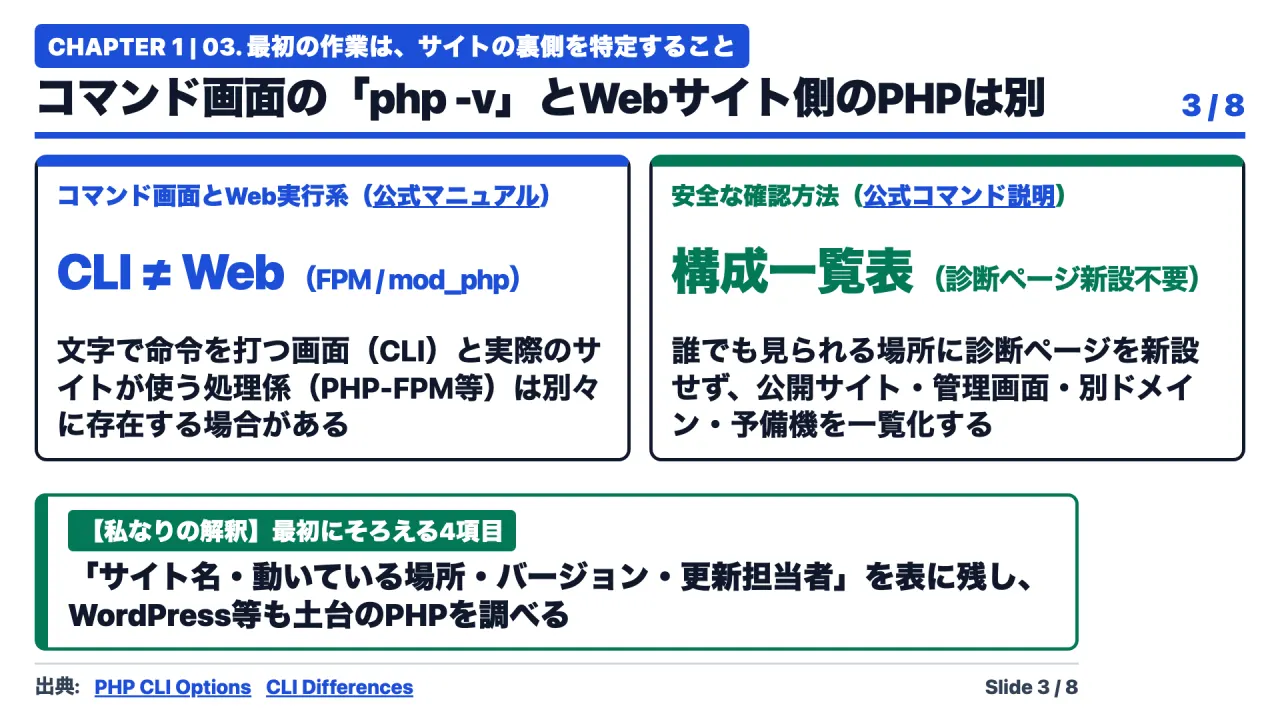
Logging into a server terminal and typing php -v verifies only the CLI binary. In modern Linux deployments, the CLI and the web runtime are distinct installations. A system may run a patched PHP 8.3 CLI binary while an unpatched PHP-FPM service or Apache module continues processing live web traffic on the same host.
Furthermore, multi-tenant servers often run distinct PHP versions across separate virtual hosts and FPM pools. Teams must build an explicit inventory table covering four essential fields:
Production PHP Service Inventory Ledger
├── 1. Service / Application Name (e.g., Billing Portal, Customer API)
├── 2. Physical Hosting Location (Server Hostname, Container ID, VM Tag)
├── 3. Web Execution Runtime (PHP-FPM Socket, mod_php, Port Assignment)
└── 4. Designated Systems Administrator / Maintenance Vendor
Security teams must avoid creating public diagnostic files (such as web-accessible phpinfo.php scripts) to inspect versions. Use authenticated terminal sessions, private management dashboards, or non-public administrative endpoints.
Step 2: Target Version Matrix and Distribution Backports
Organizations must establish explicit target versions before executing upgrades.
Official Upstream Releases
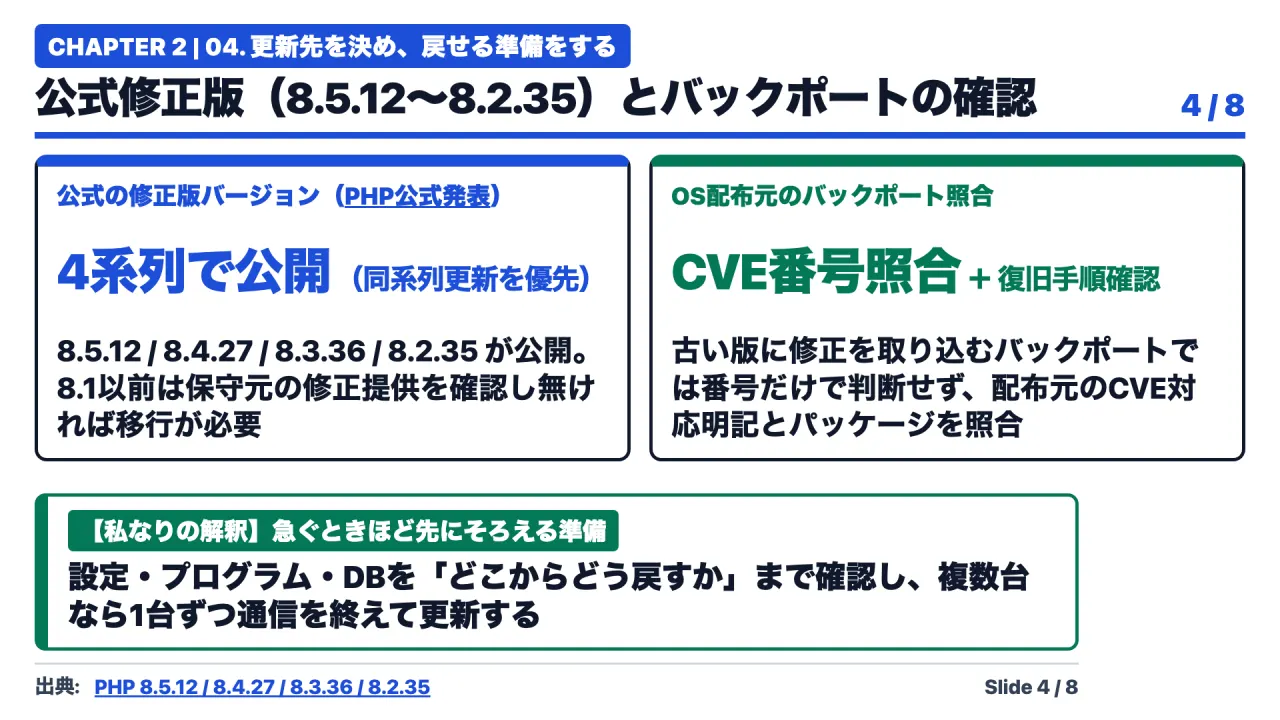
The PHP Group published four official security point releases on October 21, 2026:
- PHP 8.5 Series:
8.5.12 - PHP 8.4 Series:
8.4.27 - PHP 8.3 Series:
8.3.36 - PHP 8.2 Series:
8.2.35
During emergency patching, administrators should update within their existing minor series (e.g., advancing from 8.3.20 to 8.3.36). Attempting a major version migration (such as jumping from 8.2 to 8.5) introduces breaking syntax changes and extension incompatibilities that complicate incident response.
For PHP 8.1 and earlier (7.4, 8.0, 8.1), the upstream community provided minimal source backport branches, but these do not constitute official long-term support. Organizations running legacy versions must verify whether their Linux distribution or commercial vendor provides patched backport packages, or migrate immediately.
Understanding Linux Distribution Backports
Enterprise Linux distributions (Ubuntu, Debian, RHEL, AlmaLinux) rarely bump the upstream version number during security updates. Instead, they backport specific security fixes into their existing package revisions.
For example, on Ubuntu 24.04 LTS, the patched package may display version 8.3.6-1ubuntu0.2 rather than 8.3.36. Administrators must not judge security posture solely by comparing numbers from php -v. Cross-reference the installed package revision against the vendor’s official security notice citing CVE-2026-109618 and CVE-2026-109619.
Step 3: Linux Package Upgrades, Syntax Auditing, and Worker Purging
When managing bare-metal or virtual Linux servers, administrators must execute updates through a controlled six-stage procedure.
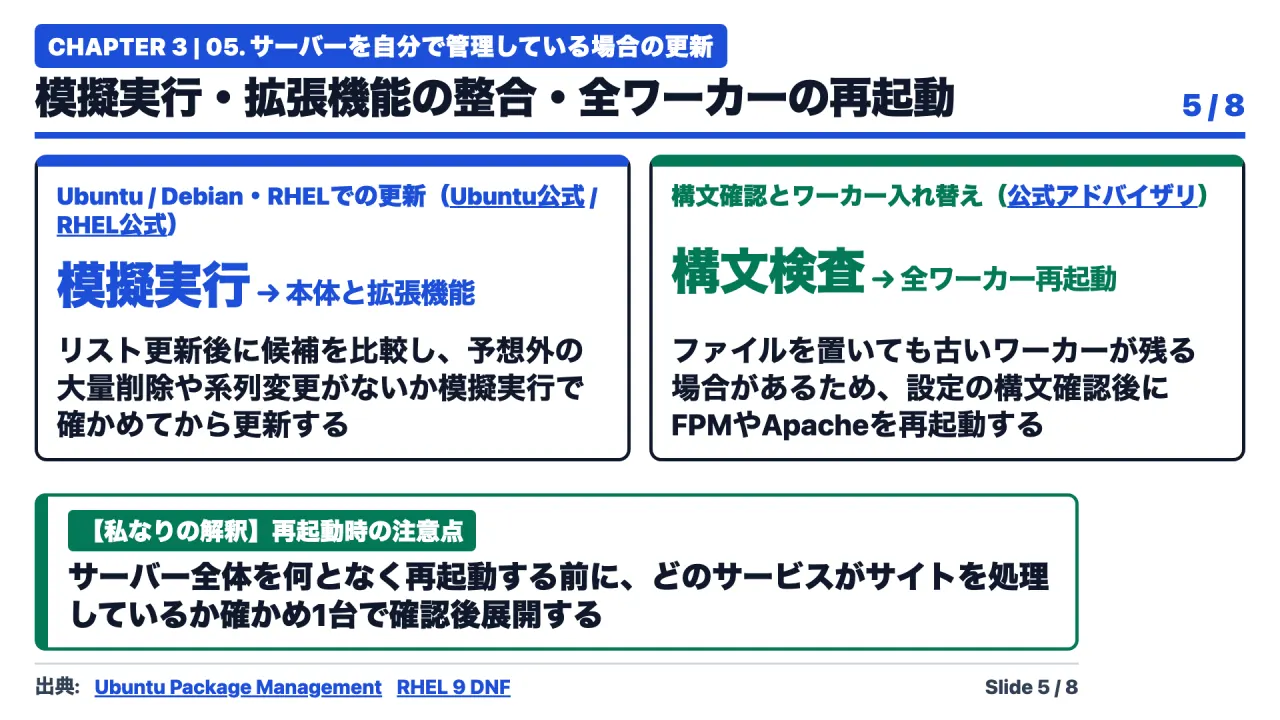
Linux Maintenance Execution Pipeline
├── 1. Refresh Package Metadata (Catalog Ingestion)
├── 2. Policy Inspection (Cross-reference installed vs. candidate package)
├── 3. Dry-Run Simulation (Detect unintended package removals)
├── 4. Atomic Upgrade (Synchronize PHP runtime with compiled extensions)
├── 5. Configuration Syntax Validation (Test php-fpm.conf / apache2.conf)
└── 6. Service Restart & Worker Purge (Verify lstart process timestamps)
The Worker Purge Requirement
Simply replacing binaries on disk does not terminate running processes. Active PHP-FPM worker pools and Apache child processes remain resident in system memory, continuing to execute vulnerable instructions.
Because CVE-2026-109619 exploits state held across requests within persistent workers, the official advisory explicitly mandates: “Restart every PHP worker.” Administrators must verify that the process start time (lstart) reflects a timestamp after the upgrade.
Step 4: Managed Hosts, Cloud Providers, and Docker Container Rebuilds
Specialized deployment environments require tailored operational procedures.
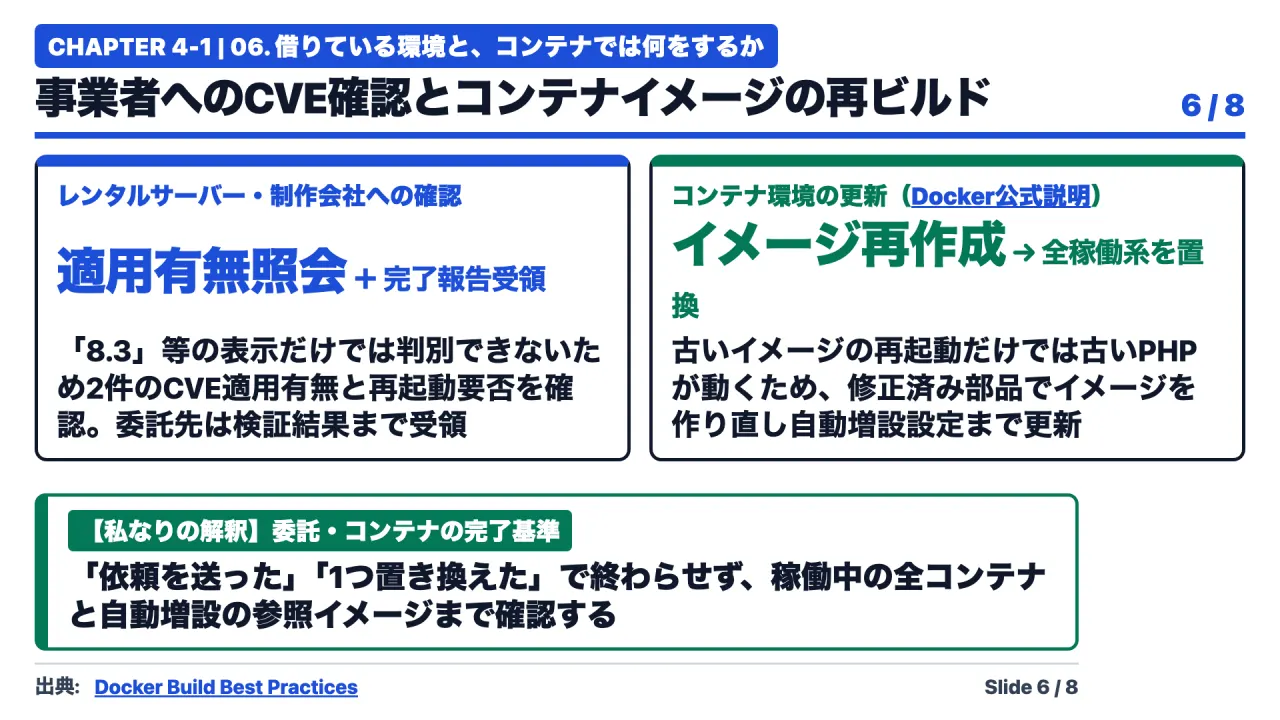
Managed Hosting and External Agencies
In shared or managed hosting environments where root terminal access is restricted, management dashboards often display generic labels like “PHP 8.3.” This label does not confirm whether patch 8.3.36 has been applied.
Administrators must submit a formal verification request to the hosting provider or maintenance agency:
“Have the security fixes for CVE-2026-109618 and CVE-2026-109619 been deployed to our hosting environment? Does our configuration require an administrative PHP pool restart or manual version selection to complete remediation?”
Ensure that vendor responses document the exact package revision, application date, and validation timestamp.
Docker and Containerized Environments
In containerized environments, restarting a container running an outdated image merely boots the exact same vulnerable binaries.
Container remediation requires a three-step rebuilding pipeline:
- Verify that upstream base images (e.g.,
php:8.3-fpm-alpine) have been updated with the October 21 patches, updating explicit SHA-256 digest pins if applicable. - Rebuild application images using
--pull(fetching fresh base layers) and--no-cache(invalidating cached build layers). - Deploy new images across all running instances, including staging environments, asynchronous worker queues, and autoscaling templates.
Step 5: Temporary Mitigations and the Severe Danger of memory_limit=-1
When immediate binary upgrades cannot be applied due to strict operational freeze windows, temporary mitigations can reduce exposure. However, mitigations are not complete substitutes for official patches.
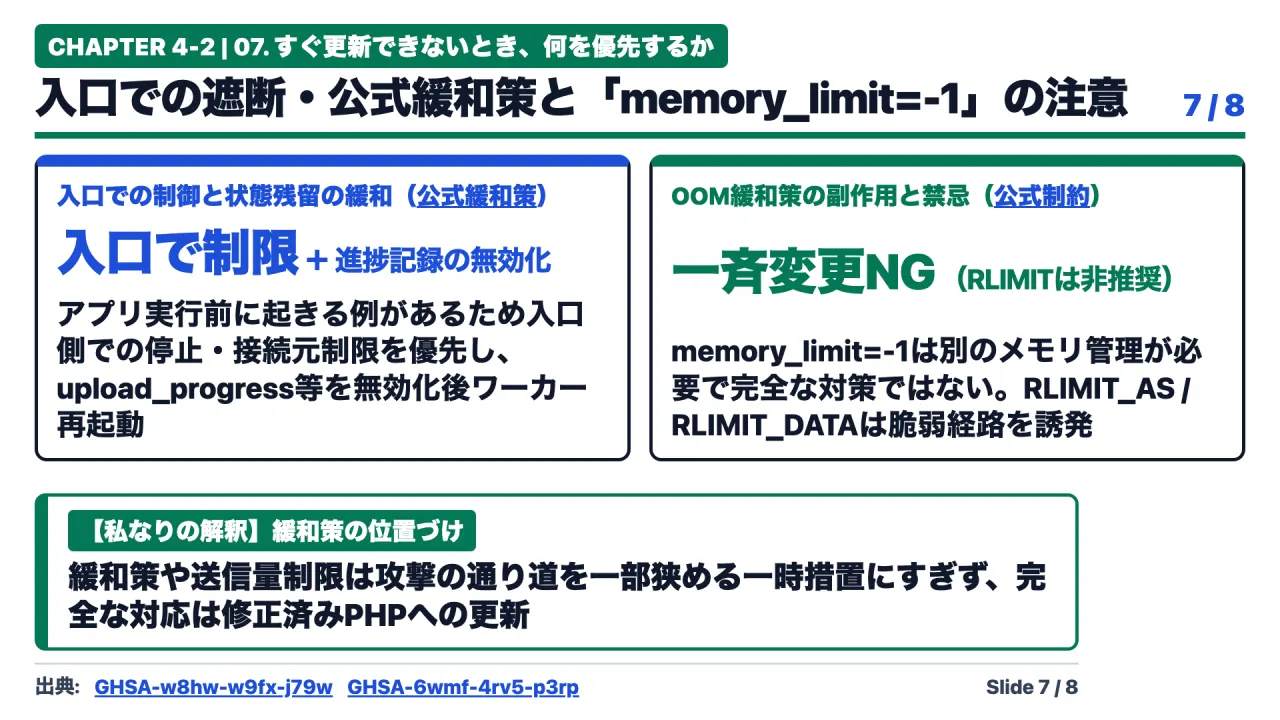
1. Ingress Network Isolation (Recommended First Action)
Because CVE-2026-109618 and CVE-2026-109619 can trigger before application-level authentication runs, displaying an application-level maintenance page in PHP provides zero protection.
Defenders should block or restrict traffic at the upstream network perimeter ── utilizing Web Application Firewalls (WAFs), reverse proxies (Nginx), or cloud load balancers. Restricting access to internal corporate VPNs or trusted IP addresses completely prevents external exploitation.
2. Upstream INI Directive Hardening
If the runtime must remain active, administrators can disable specific vulnerable subsystems:
- Disable Upload Progress: Set
session.upload_progress.enabled = 0inphp.inito close the primary pre-initialization consumer vector. - Disable Backtraces (PHP 8.5 Only): Set
fatal_error_backtraces = 0to close the persistent trace state vector. - Enforcement Rule: These settings must be defined globally in
php.inior FPM pool configuration before request parsing begins; callingini_set()inside application scripts is completely ineffective. All worker pools must be restarted.
3. The Dangerous memory_limit = -1 Pitfall
The advisory for CVE-2026-109618 notes that setting memory_limit = -1 (unlimited PHP memory) eliminates predictable soft OOM thresholds, complicating exploit delivery.
Do not deploy memory_limit = -1 across production fleets without external cgroup limits.
- Removing memory limits allows a single malicious request to consume all available physical RAM, triggering the Linux kernel Out-of-Memory Killer (
oom-killer) to terminate the entire database or web server process. - If physical memory allocation fails at the operating system level,
mmap()returns an error that directly triggers the vulnerablelongjmp()code path. - Strictly Prohibited: Never enforce process limits using
RLIMIT_ASorRLIMIT_DATA. The official advisory explicitly warns that these OS-level limits forcemmap()failures, directly inducing the vulnerable shutdown trajectory.
Step 6: The Four Criteria for Verification and Incident Separation
Remediation is incomplete until verified against four objective criteria.
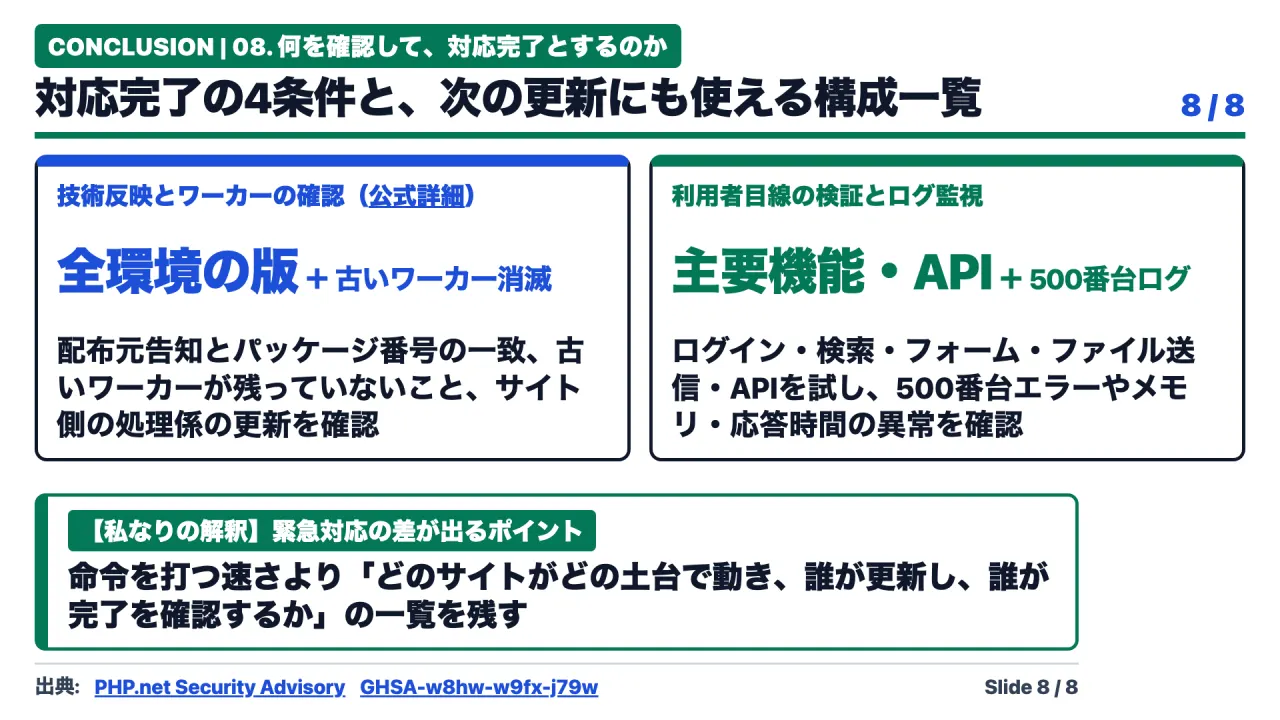
The Verification Checklist
- Package and Version Verification: Confirm that installed package revisions match vendor CVE notices across every production host, staging environment, and container image.
- Worker Process Purging: Confirm via process management commands that all PHP-FPM, Apache, and container workers exhibit start timestamps following the update.
- Application Functional Verification: Test core transactional workflows ── user authentication, search queries, contact form submissions, file uploads, and external API webhooks.
- Log Auditing: Inspect web server and PHP error logs to confirm that HTTP 500-series errors have not spiked and memory consumption remains stable.
Separating Patching from Forensic Investigation
Applying patches secures a system against future attacks; it does not remediate past intrusions.
If administrators uncover anomalous scheduled cron jobs, unmapped administrative accounts, unfamiliar PHP scripts in upload folders, or abnormal outbound network connections, patching must be accompanied by an independent forensic investigation. Preserve system logs and memory snapshots before decommissioning affected assets.
Appendix: Production Command Reference
Execute commands with appropriate administrative privileges following local change management procedures.
Ubuntu / Debian Systems (apt)
# 1. Update package lists and review candidates
sudo apt-get update
dpkg-query -W 'php*' 'libapache2-mod-php*'
apt-cache policy php8.3-fpm php8.3-cli

# 2. Execute dry-run simulation
sudo apt-get --only-upgrade -s install 'php8.3*'

# 3. Apply atomic upgrade
sudo apt-get --only-upgrade install 'php8.3*'

# 4. Verify syntax and purge workers
sudo php-fpm8.3 -t
sudo systemctl restart php8.3-fpm
ps -eo pid,lstart,args | grep '[p]hp-fpm'
RHEL / AlmaLinux / Rocky Linux Systems (dnf)
# 1. Inspect installed packages and check for updates
rpm -qa 'php*'
sudo dnf check-update 'php*'
# Note: Exit code 100 indicates updates are available; exit code 0 indicates no updates.

# 2. Execute dry-run simulation
sudo dnf upgrade --assumeno 'php*'

# 3. Apply upgrade
sudo dnf upgrade 'php*'

# 4. Verify syntax and restart service
sudo php-fpm -t
sudo systemctl restart php-fpm
ps -eo pid,lstart,args | grep '[p]hp-fpm'
Docker Container Validation
# Rebuild image bypassing cache with latest base layers
docker build --pull --no-cache -t enterprise-app:php-patched .

# Verify patched version inside container
docker run --rm enterprise-app:php-patched php -v

# Inspect running container process start times
docker exec <container_id> ps -eo pid,lstart,args
Primary Sources and References
- PHP.net News Archive: Official Security Releases (October 2026)
- GitHub Security Advisory: RCE via OOM State Corruption (CVE-2026-109618 / GHSA-w8hw-w9fx-j79w)
- GitHub Security Advisory: RCE via Stale Global State (CVE-2026-109619 / GHSA-6wmf-4rv5-p3rp)
- PHP Manual: Command Line Options and Differences Across SAPIs
- Ubuntu Server Documentation: Package Management and Security Upgrades
- Red Hat Enterprise Linux 9: Managing Software Packages with DNF
- Docker Documentation: Image Building Best Practices ── Rebuild Often
- Debian Manual: apt-get(8) Simulation and Upgrade Options
- DNF Command Reference: check-update and Exit Codes