Inside OpenBot 1.0: Why the Self-Hosted AI Coworker Workspace Halts After Ten Consecutive Failures and How It Governs Computer-Use Execution
An architectural deep dive into CopilotKit’s open-core workspace reveals how one-shot demonstration learning, live human takeover during 2FA, CEL boundary policies, and the triple-standard stack of AG-UI, MCP, and A2UI 1.0 solve enterprise agent execution.
Published: November 12, 2026 | Read time: ~10 min | Watch Video (Japanese)
Executive Summary: Beyond Conversational Chatbots to Governed Agent Workspaces
Across enterprise IT, finance, and operations, autonomous automation faces two bottlenecks:
- The API Blindspot: Core workflows rely on legacy ERP portals, expense systems, and partner extranets lacking APIs. Employees spend hours cross-referencing records and copy-pasting data between cloud drives and intranet forms.
- The Runaway Execution Risk: IT security teams hesitate to grant agents open access to browsers. The danger of an agent entering an infinite loop, racking up cloud API fees, or executing unauthorized disbursements without verification represents an unacceptable fiduciary risk.
On November 10, 2026, CopilotKit released OpenBot 1.0. Built as an open-core, self-hosted workspace for AI coworkers, OpenBot bridges autonomous multi-modal execution and deterministic corporate governance.
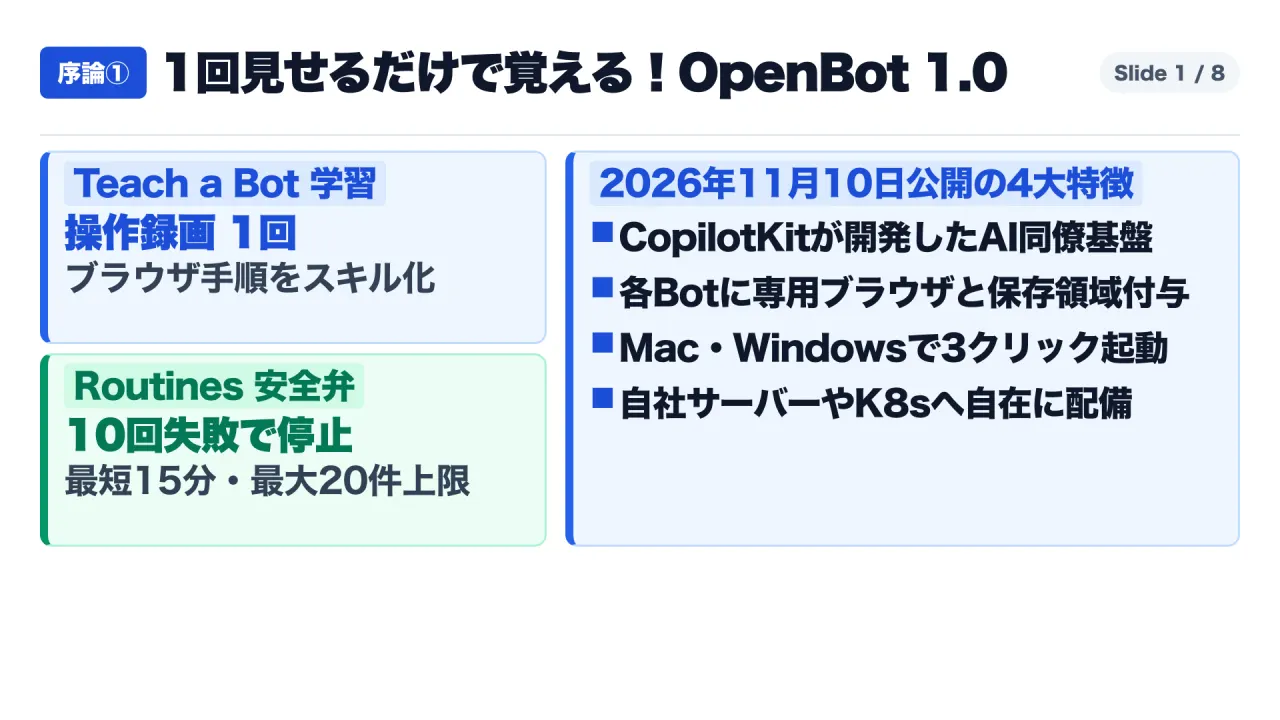
Rather than treating the agent as a passive chat window, OpenBot provisions each AI coworker with an isolated environment: a dedicated Chromium browser, a scoped /workspace virtual filesystem, and a sandboxed shell. The platform incorporates three core operational mechanisms:
- Teach a Bot: A demonstration recorder parsing user browser actions into reusable skill definitions (
SKILL.md) requiring administrative review before organizational release. - Take-the-Wheel: An in-line human takeover protocol allowing operators to seize keyboard and mouse control during two-factor authentication (2FA) challenges directly within the live browser stream, returning execution control without exposing credentials.
- Routines with Fatigue Governance: A natural-language task scheduler governed by strict circuit breakers: a mandatory 15-minute execution floor, a ceiling of 20 active routines, and an automatic shutoff triggered after ten consecutive execution failures.
This forensic review synthesizes primary documentation across corporate releases, specifications, and container audits. It analyzes OpenBot’s execution engines, audits GitHub star claims against repository data, maps open-source MIT modules against enterprise licensing, and establishes a practical governance framework for deployment.
Epistemological Audit: Fact-Checking GitHub Stars and Commercial Licensing Boundaries
In evaluating enterprise infrastructure software, corporate decision-makers must distinguish between open-source promotional claims and legally binding licensing constraints.
1. Deconstructing the “10,000 GitHub Stars” Adoption Metric
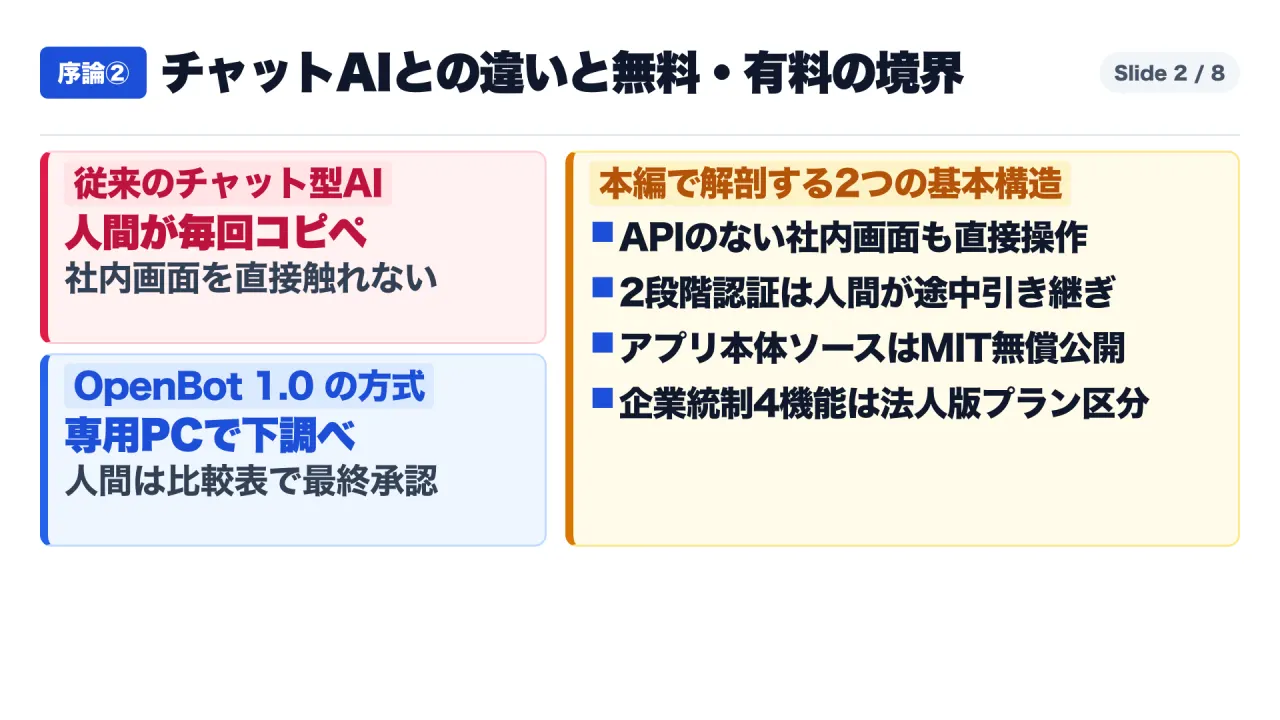
Launch announcements cite “over 10,000 GitHub stars” (with enterprise materials citing “over 19,000 stars”) as evidence of immediate product adoption. An inspection of repository histories reveals that these figures do not represent organic developer stars accumulated on a single new repository.
Instead, the metric reflects cumulative stars across the CopilotKit modular ecosystem since June 2026 (OpenBot, OpenMuse, OpenDots, OpenTag, and OpenDuet). While CopilotKit has verified enterprise deployments, planners must recognize that this total reflects broader ecosystem brand equity rather than standalone OpenBot 1.0 adoption.
2. The Open-Core Licensing Boundary: MIT License vs. OpenBot for Business
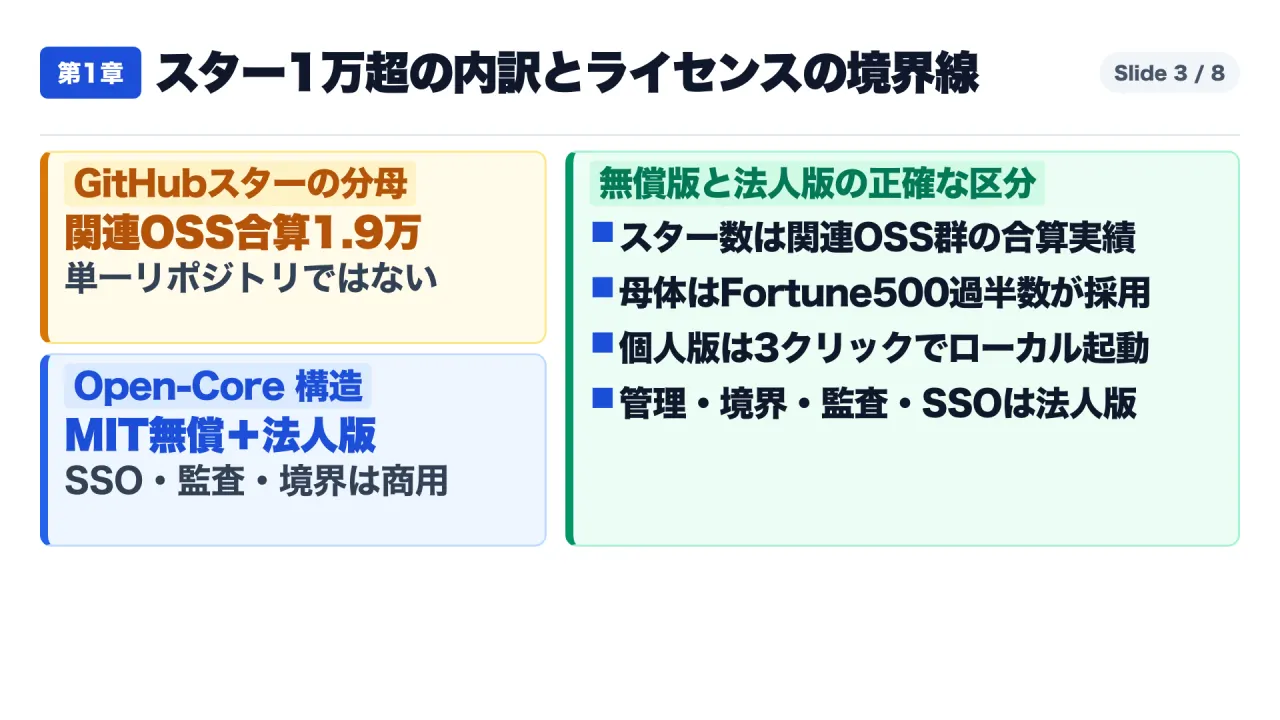
OpenBot operates under an Open-Core model. An analysis of licensing declarations establishes a clear boundary between community and proprietary functionality:
| Functional Layer | Licensing Tier | Included Capabilities | Commercial Governance Implications |
|---|---|---|---|
| Core Client & Runtimes | MIT License (Free / Community) | Desktop client (Mac, Windows), single-node Docker Compose, Hono API server, PostgreSQL (pgvector), isolated Chromium containers, basic chat UI. | Available for unconstrained commercial modification, local testing, and small-team deployment without licensing fees. |
| Administrative & Governance Tier | Commercial (OpenBot for Business) | Admin View: Unified console. / Boundaries: Common Expression Language (CEL) policy engine. / Audit Engine: Tamper-evident logging with CSV export and OpenTelemetry SIEM forwarding. / Enterprise Controls: SAML 2.0 / OIDC SSO, SCIM 2.0 provisioning, air-gapped offline Kubernetes Helm charts. | Essential for enterprise compliance, security reviews, role-based access control, and mandatory data governance. |
| Intelligence & Memory | Tiered Split | Desktop v1.0.1+ permits single-user local CopilotKit Intelligence setup. Shared cross-organization semantic memory requires enterprise infrastructure. | Enterprise rollouts requiring persistent organizational knowledge bases must budget for commercial licensing. |
Architectural Deep Dive: The $270 Hotel Expense Audit and Take-the-Wheel Hand-off
Consider the production case study documented in CopilotKit’s release: auditing a $270 corporate travel hotel expense report.
The Operational Challenge: Disconnected Systems and Pre-Tax Ambiguity
Processing an expense claim often requires cross-referencing unstructured document repositories with strict legacy accounting portals:
- Corporate Policy Document (Google Drive): Mandates that hotel accommodations must not exceed a pre-tax maximum of $250 per night.
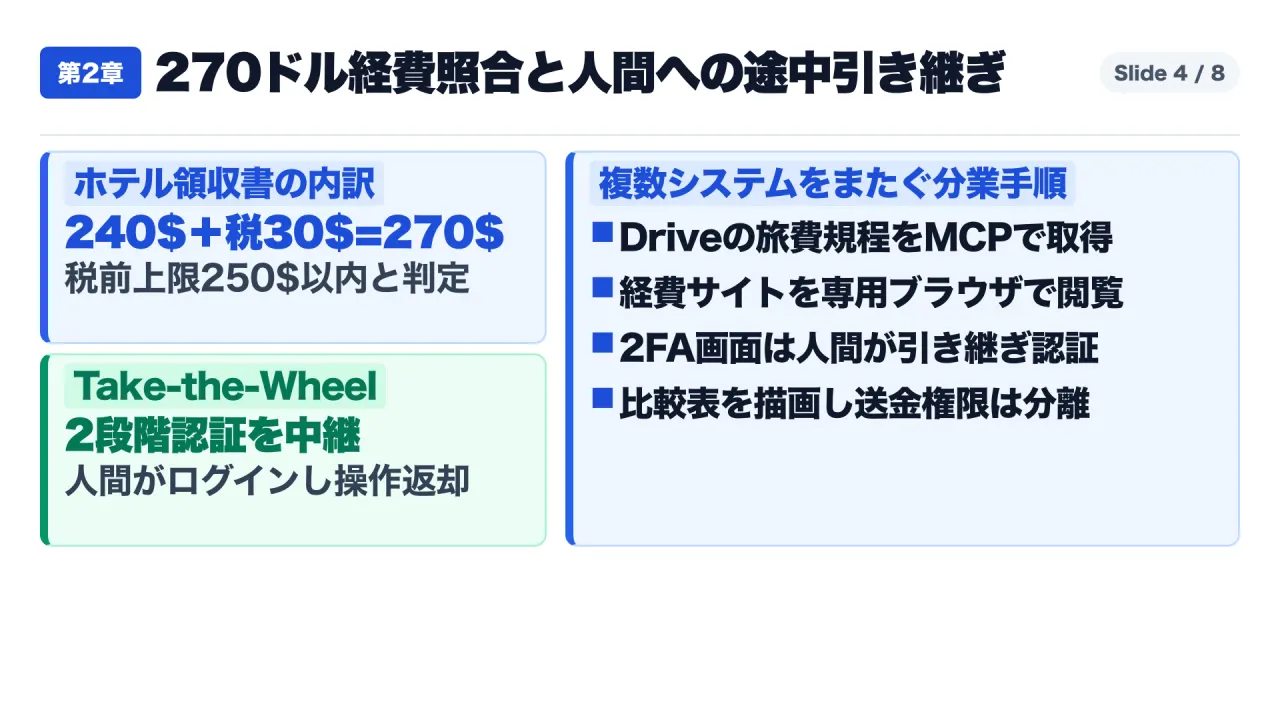
- Submitted Lodging Receipt (Internal Accounting Web Portal): Itemizes a single night stay reflecting a $240 room rate + $30 state and local occupancy taxes = $270 total invoice.
When subjected to rudimentary Robotic Process Automation (RPA), an automated rule checking total invoice value against the $250 ceiling triggers a false rejection because $270 exceeds $250. Conversely, an ungrounded conversational LLM without direct portal integration cannot access the intranet web form or requires the employee to manually transcribe sensitive corporate data into an external cloud prompt.
The Three-Phase Resolution Architecture
OpenBot executes this task through a disciplined human-agent collaborative loop:
- Hybrid Context Retrieval via MCP and Headless Browser: The agent queries corporate travel policy via a read-only Model Context Protocol (MCP) server connected to Google Drive, enforcing user-scoped permissions. Concurrently, because the internal accounting portal provides no public API, the agent spins up its dedicated Chromium browser container and navigates to the corporate intranet portal.
- Deterministic Security via Take-the-Wheel: Upon reaching the portal login gateway, the agent encounters a mandatory Two-Factor Authentication (2FA) challenge. Through Take-the-Wheel, the user views the agent’s live browser canvas and takes immediate mouse and keyboard control. The human enters the one-time passcode directly into the portal native input fields. Once authentication succeeds, the user clicks “Return Control to Bot.” The transaction lifecycle, takeover duration, operator identity, and post-authentication DOM state are committed to an immutable audit ledger, preserving zero-trust credential hygiene.
- Dynamic A2UI Synthesis and Privilege Separation: Upon inspecting the invoice, the agent extracts itemized line items: Room Rate ($240), Occupancy Tax ($30), and Total Charged ($270). Comparing the $240 room charge against the $250 pre-tax threshold, the agent confirms policy compliance. Instead of generating text, the agent leverages A2UI 1.0 (Agent-to-UI) to render an interactive side-by-side reconciliation card inside the user workspace. Crucially, OpenBot enforces strict separation of execution privileges: the agent is granted read-only parsing and form-preparation tools, while wire transfer and final payment disbursement capabilities are structurally omitted from its permissible tool registry.
Autonomous Skill Acquisition: Teach a Bot and the Routines Fatigue Rule
Standard agent frameworks suffer from brittle Playwright scripting and resource depletion when external websites change layout.
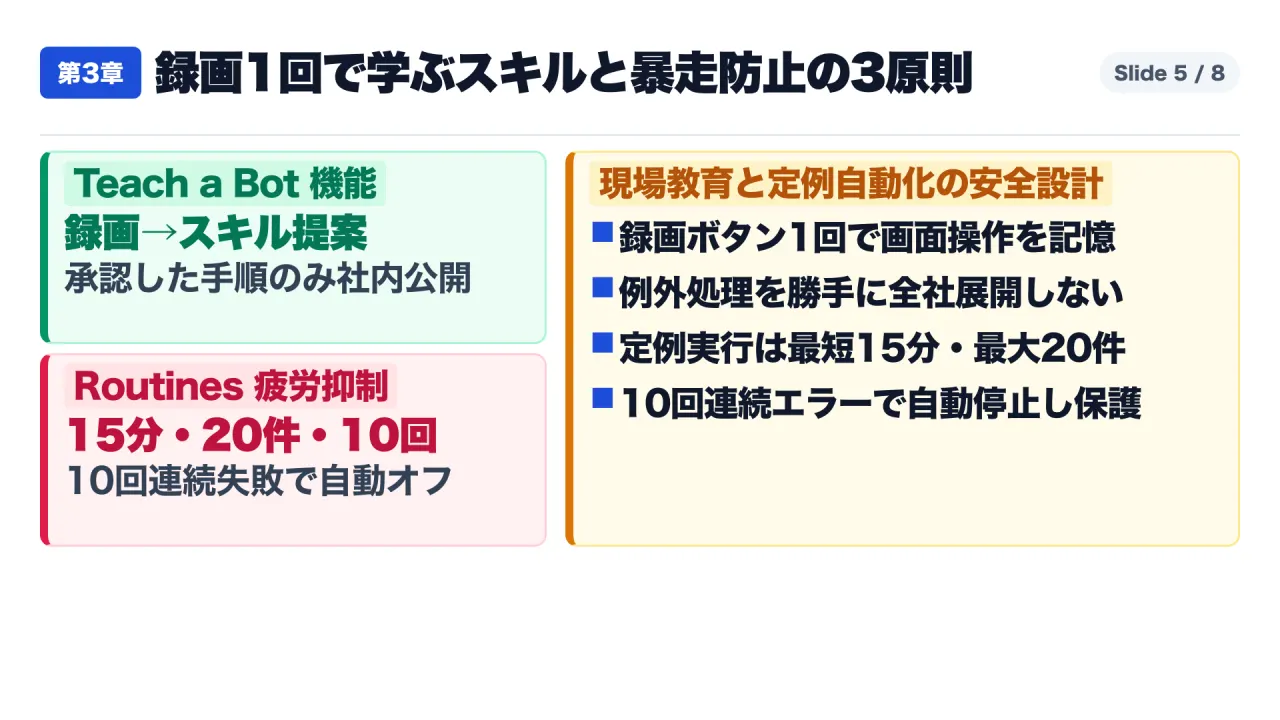
1. Teach a Bot: One-Shot Demonstration to Verified Enterprise Skills
When an agent misinterprets a complex invoice, the operator engages Teach a Bot:
- The operator clicks
Recordwithin the agent browser view. - The operator manually demonstrates the correct procedure on screen.
- CopilotKit Intelligence processes screen telemetry, DOM mutations, and action coordinates, synthesizing an optimized, declarative procedure documented in standard Markdown (
SKILL.md). - Administrative Verification Gate: The compiled skill is routed to an administrative staging queue where managers review generated instructions, preventing individual exceptions from contaminating baseline compliance logic.
2. Routines and the Fatigue Rule: Deterministic Execution Dampeners
For recurring background workflows, OpenBot provides a natural-language scheduler termed Routines governed by three non-configurable circuit breakers:
| Safety Metric | Specification Ceiling | Prevented Operational Catastrophe |
|---|---|---|
| Minimum Execution Floor | 15-Minute Floor | Prevents conversational prompts from initiating sub-second polling loops that trigger target server DDoS alerts or exhaust upstream API rate limits. |
| Active Concurrency Ceiling | Cap of 20 Active Routines | Prevents routine sprawl, where forgotten background tasks accumulate across teams and consume memory, container sockets, and infrastructure. |
| Consecutive Failure Cutoff | Automatic Deactivation After 10 Consecutive Failures | When an external portal changes its login flow or undergoes downtime, unconstrained agents repeatedly retry failed actions. The 10-failure cutoff stops execution, alerting the administrator rather than burning model spend forever. |
Interoperability Framework: AG-UI Protocol, MCP, and A2UI 1.0
OpenBot 1.0 avoids vendor lock-in through an explicit division of labor across three open specifications:
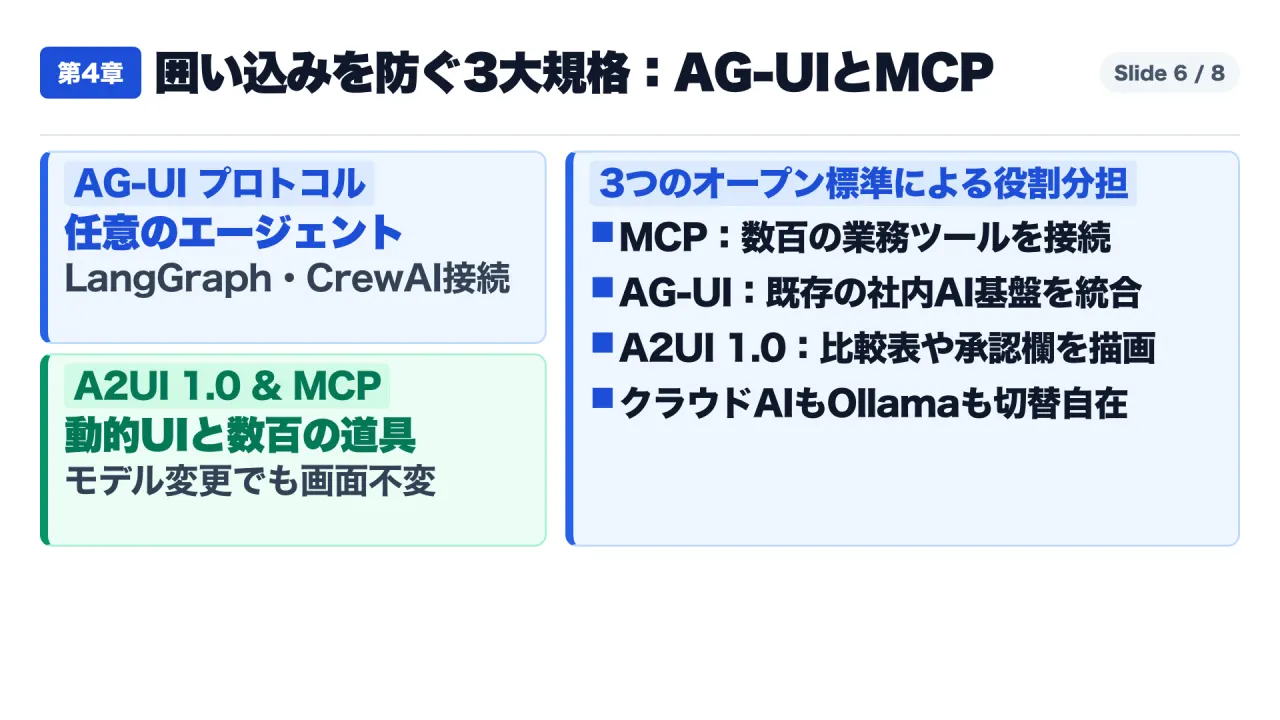
1. Model Context Protocol (MCP): Tool and Data Abstraction
MCP governs how the agent reads structured data and invokes external functions. OpenBot integrates standard MCP servers across Google Drive, Notion, Slack, and web-scraping backends (Parallel, Exa, Firecrawl), alongside enterprise aggregators including Composio and Arcade. Multi-account credential multiplexing enables an agent to interface with distinct departmental mailboxes while preserving identity isolation.
2. AG-UI Protocol 1.0: Bidirectional Agent-User Communication
Formulated by CopilotKit, the Agent-User Interaction (AG-UI) Protocol standardizes communication between back-end reasoning engines and front-end interfaces.
- Bring Your Own Agent (BYOA): Teams with custom agent logic in LangGraph, CrewAI, Mastra, Pydantic AI, Agno, Google ADK, Microsoft Agent Framework, AWS Strands, or Oracle Agent Spec can expose an AG-UI endpoint and attach their custom agent into OpenBot.
- Managed Agent Connectivity: Managed services on Amazon Bedrock AgentCore or Microsoft Foundry Agent Service connect directly without interface refactoring.
- Model Agnosticism: Administrators configure reasoning providers per bot, routing between commercial frontier models and private models hosted via Ollama or vLLM, including fine-grained parameter tuning over thinking effort.
3. A2UI 1.0: Generative User Interface Catalog
As defined in AG-UI specifications, AG-UI serves as the transport protocol, whereas A2UI (Agent-to-UI) represents the generative UI presentation standard. Built on CopilotKit 1.83, OpenBot 1.0 renders real-time graphical artifacts—dynamic data charts, structured approval cards, side-by-side discrepancy matrices, and interactive form fields—directly inside the stream. Workspace layouts toggle across three primary interface paradigms: OpenDuet (conversational split-screen), OpenDots (coordinate-centric canvas), and OpenMuse (dense multi-modal workbench).
Enterprise Defense Mechanisms: Boundaries and Operational Pitfalls
Deploying autonomous computer-use agents within corporate networks exposes IT infrastructure to unique threat vectors, specifically indirect prompt injection and uncontrolled token consumption.
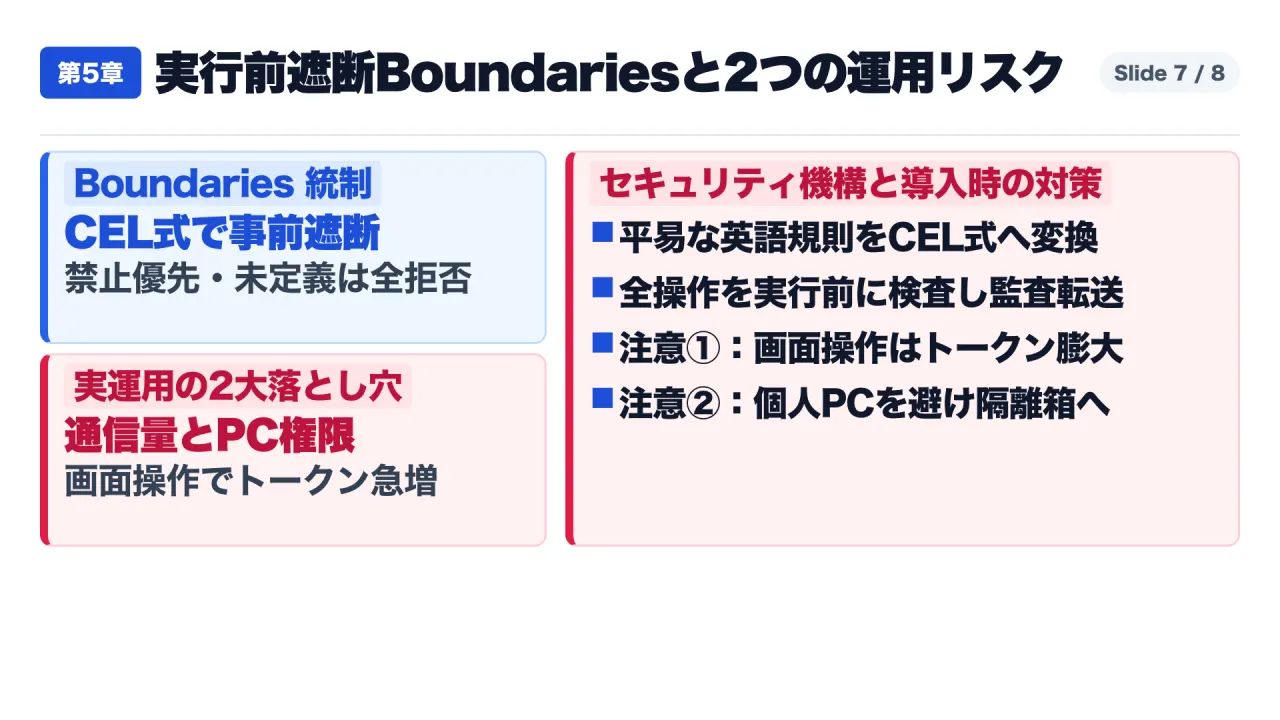
1. Pre-Execution Policy Enforcement via Common Expression Language (CEL)
In commercial enterprise deployments, OpenBot routes proposed agent actions through an intercepting governance gateway termed Boundaries:
- Declarative Policy Compilation: Administrators draft plain-English boundary constraints within
/admin/boundaries, compiled into deterministic Common Expression Language (CEL) evaluation expressions. - Evaluation Priority and Fail-Closed Posture: When an agent attempts an action (invoking an MCP tool, clicking a DOM selector, issuing a shell command, or accessing a filesystem path), the CEL engine intercepts the payload prior to execution. Policies enforce a strict Deny-before-Allow hierarchy. Ambiguous policies default to a Fail-Closed state, terminating the operation.
- Permission Inheritance and SIEM Auditing: Document retrieval inherits origin access controls. Every intercepted action is recorded in an append-only audit database (
/admin/audit), exportable as CSV or streamable to corporate SIEM platforms via OpenTelemetry collectors.
2. Two Critical Operational Pitfalls in Enterprise Rollouts
Forensic technical analysis identifies two severe implementation traps requiring mitigation:
- Token Exhaustion via Continuous Computer Use: Downstream model inference costs are billed directly to corporate API keys. Autonomous browser operation relies on repeated DOM tree serialization, visual screenshot encoding, and multi-turn iterative reasoning. A routine executing every 15 minutes that parses complex web applications can consume millions of vision tokens daily. Mitigation: Implement a tiered model routing architecture. Assign small, locally hosted inference models (via Ollama or vLLM) or high-throughput, low-cost commercial models to perform initial scheduled checks, DOM polling, and routine status verification. Reserve frontier commercial models exclusively for complex edge-case reconciliation and exception resolution.
- The Host Compromise and Indirect Injection Hazard: Executing desktop agent binaries directly on an employee bare-metal workstation creates a direct vector for indirect prompt injection. If an agent visits an external webpage containing hidden adversarial text, an unconstrained desktop agent could execute exfiltration commands against local files.
Mitigation: Always enforce OpenBot’s Isolated Computers container architecture. Ensure agents execute exclusively inside isolated Chromium instances within locked-down Docker/Kubernetes pods where filesystem access is restricted strictly to an ephemeral
/workspacemount, fully segregated from host operating system credentials.
Strategic Implementation Playbook: Three Practical Steps for Safe Deployment
The technical trajectory illustrated by OpenBot 1.0 demonstrates that competitive differentiation in enterprise AI has shifted. The fundamental performance metric is no longer raw model benchmark scores; it is the robustness of the governance workspace that mediates between autonomous reasoning, legacy software interfaces, and human supervision.
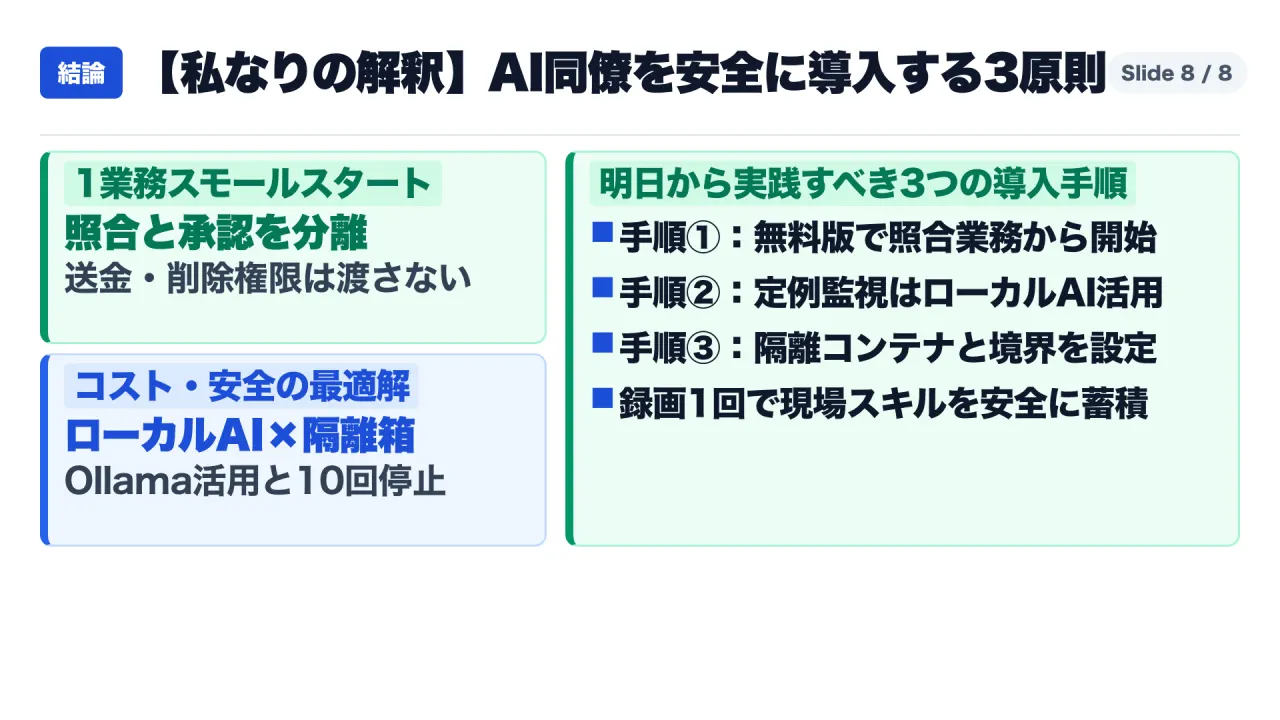
Enterprise technology leaders should execute a structured, three-phase adoption roadmap:
- Step 1: Initial Containment (Read-Only Reconciliations): Deploy OpenBot Personal Edition or a single-node Docker Compose instance on an internal staging server. Select a labor-intensive workflow characterized by cross-system verification without native APIs (such as hotel lodging expense reconciliation). Explicitly restrict the agent permissible tool registry: grant read-only document access and browser navigation, while entirely withholding disbursement, database write, or external messaging permissions.
- Step 2: Cost and Concurrency Calibration: Prior to activating recurring background Routines, configure the workspace to leverage local inference engines (Ollama or vLLM) for high-frequency polling tasks. Verify that all automated jobs adhere to the 15-minute execution floor and test the 10-failure automatic deactivation mechanism by intentionally introducing invalid credentials on a staging endpoint.
- Step 3: Enterprise Hardening and Skill Governance: When expanding deployment across operational departments, transition to OpenBot for Business on internal Kubernetes infrastructure. Enforce container isolation (
Isolated Computers), connect corporate SSO/SCIM identity directories, and establish a mandatory administrative approval board for all newly demonstrated skills generated via Teach a Bot.
Primary Sources and References
- CopilotKit OpenBot 1.0 Official Release (November 10, 2026): Introducing OpenBot 1.0: An Agent Workspace You Can Make Your Own
- CopilotKit OpenBot for Business Enterprise Launch (November 10, 2026): Introducing OpenBot for Business: Self-Hosted AI Coworkers, Built for Your Company
- OpenBot GitHub Repository & Technical README: GitHub - CopilotKit/OpenBot: Open-source AI coworkers that each get a computer of their own
- OpenBot Official CHANGELOG (A2UI 1.0 Catalog & Local Intelligence): OpenBot/CHANGELOG.md at main · CopilotKit/OpenBot
- AG-UI Protocol Specification (Agent-User Interaction Standard): AG-UI Overview - Agent User Interaction Protocol
- RepoCloud Architecture Verification Audit (CEL Policy Engine & Isolation): RepoCloud | OpenBot — Self-hosted AI coworker platform with governed computer access