Google Gemini Notebook Interactive Sites: Full-Notebook Access Risk, 3-Year Retention, and 5-Hour Compute Caps
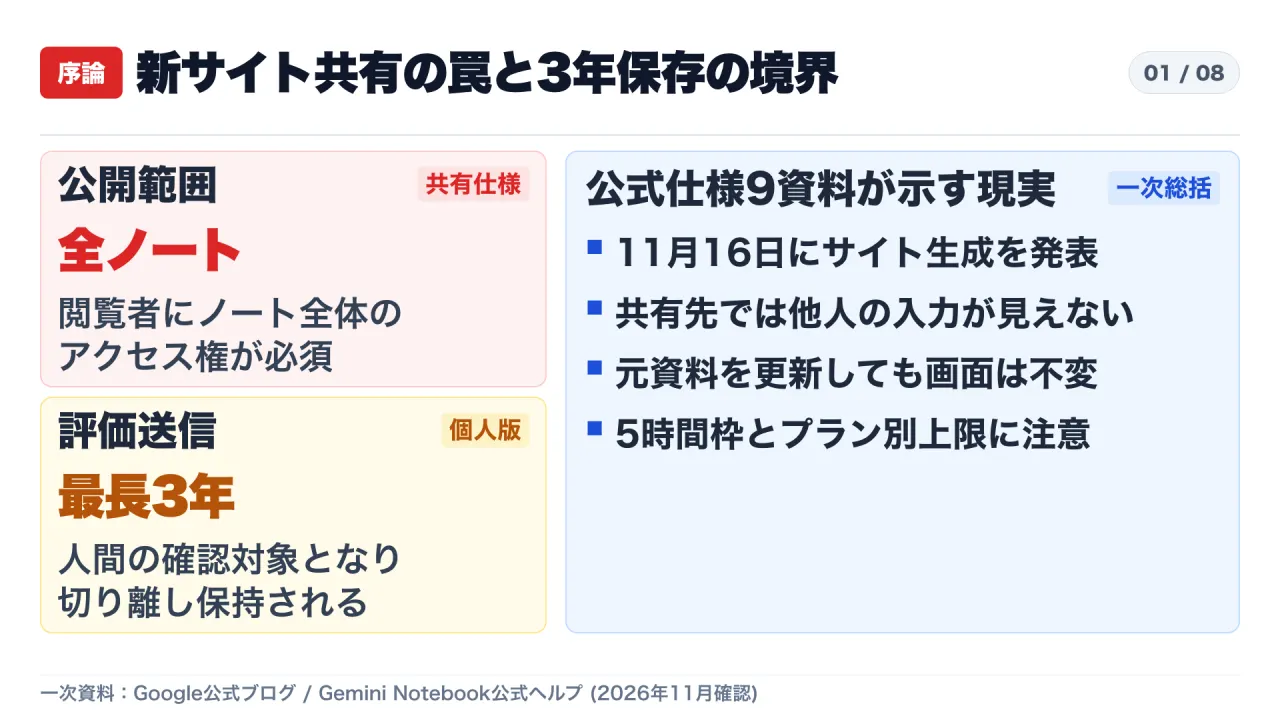
Google’s Interactive Sites feature lets users turn source documents into web apps via a single chat prompt, yet official documentation reveals that sharing a site exposes access to the entire notebook and feedback submission triggers up to 3-year human review retention on consumer accounts.
Japanese Edition: Read the original Japanese article on Substack
Video Episode (Japanese Audio): Watch on YouTube
On November 16, 2026 (U.S. time), Google announced Interactive Sites inside Gemini Notebook—the research and knowledge workspace renamed from NotebookLM on July 16, 2026. By typing "make me a site" followed by a short description in the chat panel, users can automatically generate interactive web pages from their uploaded sources, ranging from visual study guides and historical timelines to quarterly revenue filtering dashboards and deadline-driven task trackers.
For engineering leaders, security teams, and enterprise knowledge managers, however, headline product announcements rarely capture the operational boundaries hidden inside official support documentation. A cross-check of nine primary Google blog posts and official Gemini Notebook Help documents shows three critical technical constraints around site sharing, plus strict plan-tier ceilings and a sharp legal divide between consumer Google accounts and Google Workspace core services.
- Core Thesis: Sharing an Interactive Site requires granting viewers access to the entire underlying notebook rather than just the generated page, while user inputs remain isolated per viewer, generated sites never auto-update when sources change, and consumer feedback buttons route prompts and uploaded files into a human review pipeline retained for up to 3 years.
- Primary Sources Verified: Two official Google blog announcements (July 16, 2026 and November 16, 2026) and seven official Gemini Notebook Help specifications covering site generation, source management, plan limits, 5-hour compute quotas, consumer privacy terms, Workspace coverage, and Gemini Apps integration.
- Actionable Strategic Takeaways: Teams must separate public-ready sharing notebooks from internal working notebooks containing confidential PDFs, treat generated sites as static point-in-time snapshots rather than live shared databases, and restrict business-sensitive workloads to Google Workspace core services where human review and model training are excluded even on feedback events.
1. Overview of Interactive Site Generation From Chat Prompts
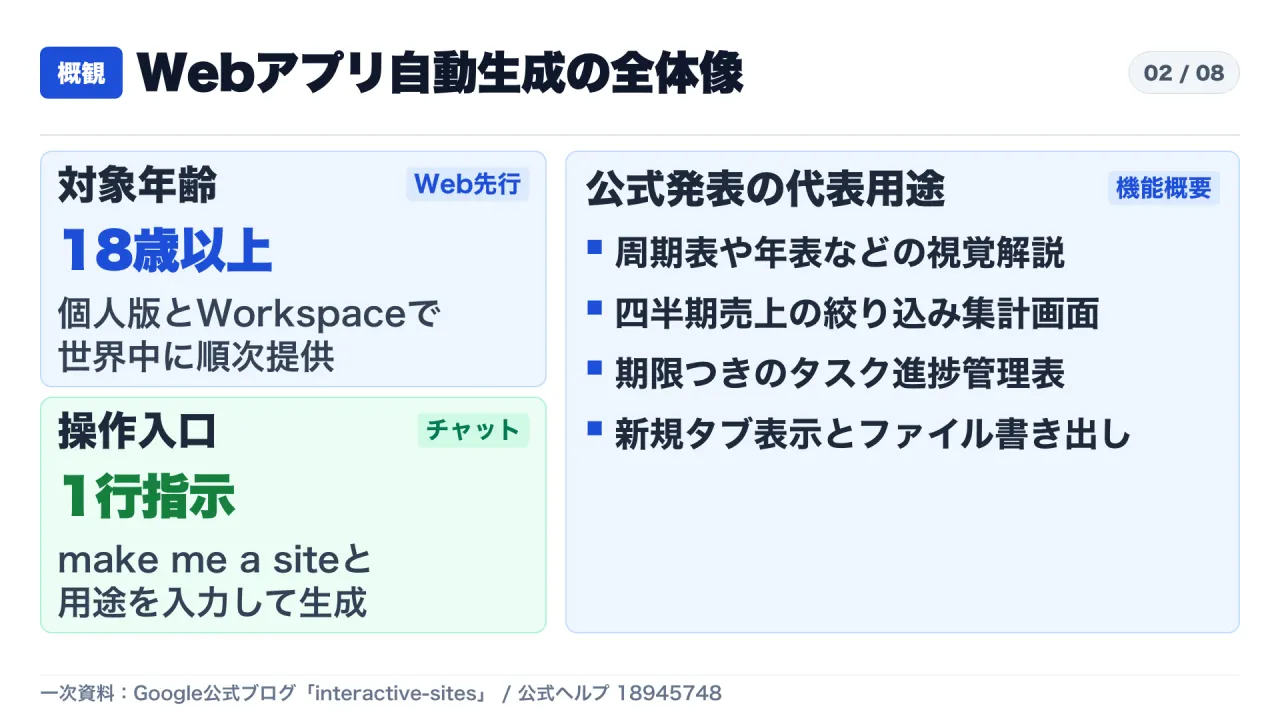
The shift from passive document summarization to executable web interfaces represents a major expansion of the Studio panel inside Gemini Notebook. Under the official rollout announced on November 16, 2026, Interactive Sites is being deployed progressively on the web interface (notebook.google.com) for individual users aged 18 and older as well as eligible Google Workspace customers, with mobile application support slated for a subsequent release.
To create a page, a user opens the chat panel inside a notebook and enters "make me a site" alongside the intended purpose and layout requirements. Within minutes, the Studio panel compiles an interactive interface grounded in the notebook’s sources. Google’s official demonstrations highlight three representative patterns: interactive visual explainers such as periodic tables or historical chronologies, quarterly revenue dashboards with filter controls, and project progress trackers with deadlines. Completed pages can be operated directly inside the Studio panel, opened in a dedicated browser tab, or exported as files.
Yet the ease of generating a working web interface from a one-line prompt creates an immediate governance hazard if teams assume that sharing the generated page behaves like publishing an isolated web application. In practice, the sharing boundary, state persistence model, and refresh lifecycle operate under very different rules.
2. Three Technical Constraints Behind Site Sharing
Google’s official help documents—“Generate sites in Gemini Notebook” (answer/18945748) and “Add or discover new sources for your notebook” (answer/16215270)—spell out three structural constraints that teams must understand before sending a link to external partners, clients, or broader internal groups.
| Constraint Area | Official Specification | Operational Risk & Mitigation |
|---|---|---|
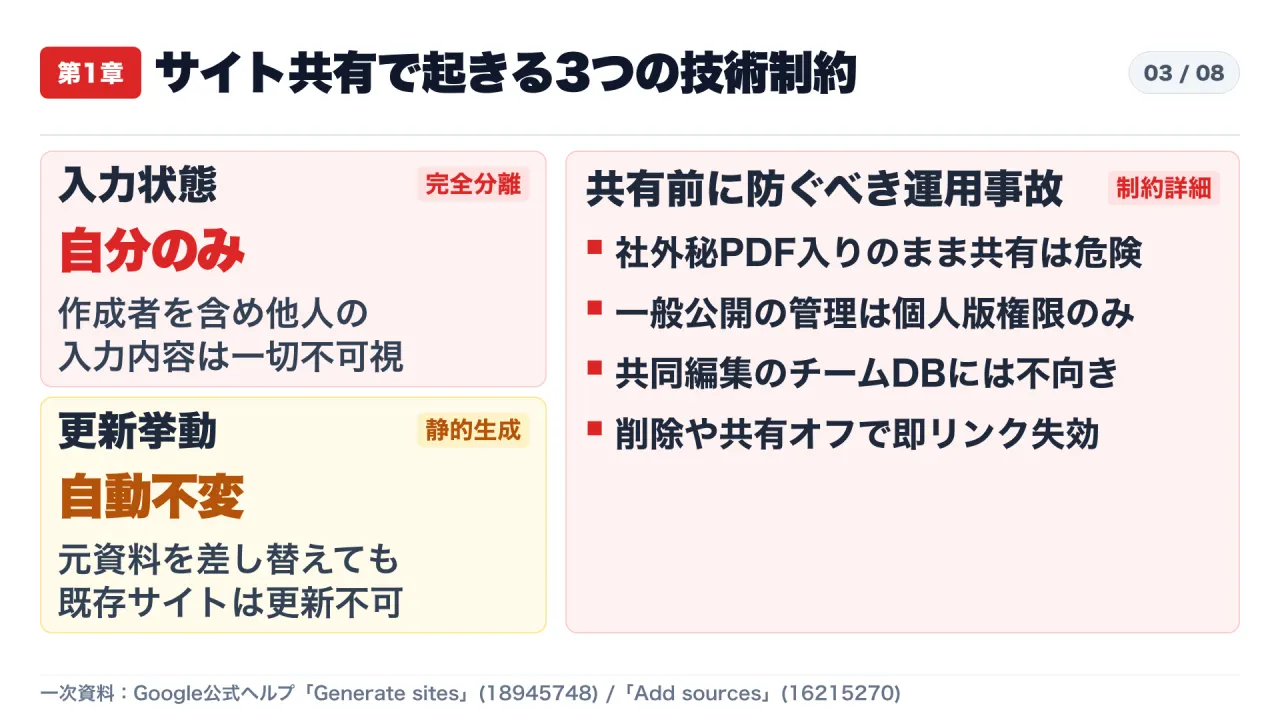
| Access Scope & Public Sharing | Sharing a site link requires granting recipients access to the entire notebook (either named recipients or anyone with the link). Managing public link access is restricted to owners or editors on personal Google accounts. | Never generate and share a site directly from a working notebook that contains confidential PDFs, client lists, or internal drafts. Create a dedicated sharing notebook containing only vetted, publishable sources. |
| Per-User Input Isolation | Interactive elements such as checkboxes and note fields auto-save locally to each viewer’s session, yet every user—including the creator—can see only their own inputs; others’ inputs are completely invisible. | Interactive Sites cannot function as a multi-user shared database or collaborative task board. Restrict usage to distributed self-study materials, onboarding checklists, and individual assessments. |
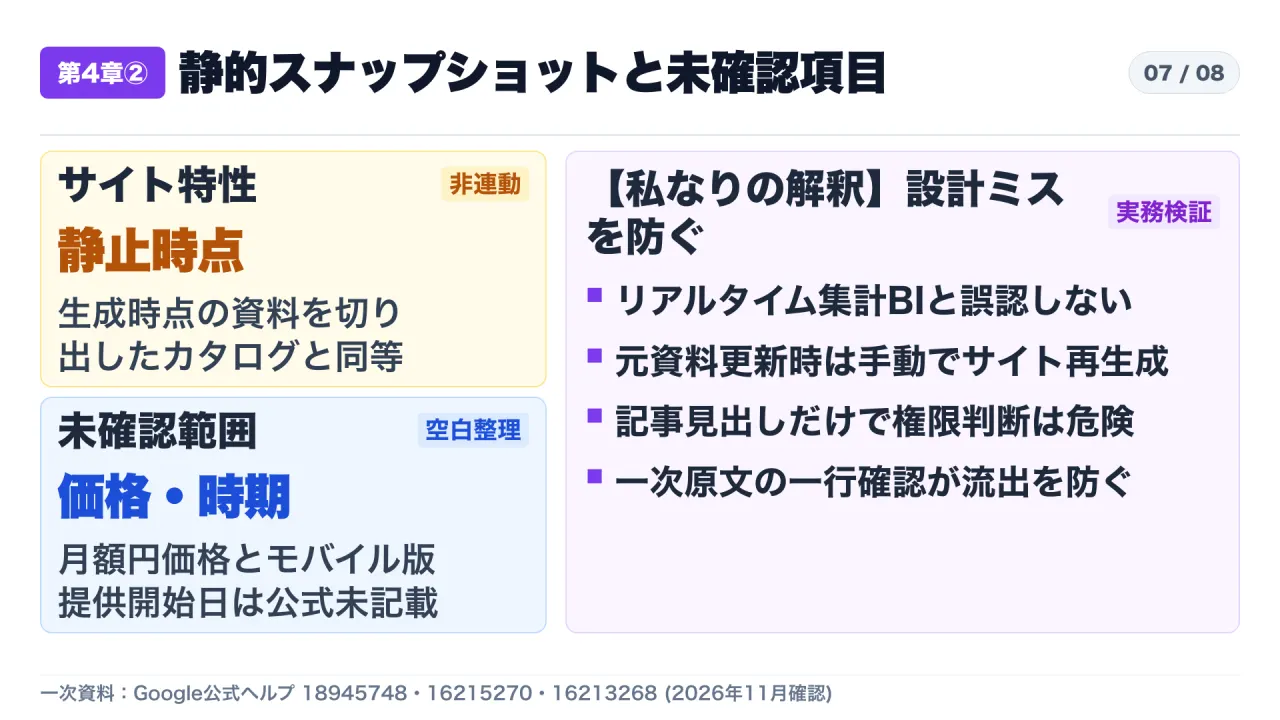
| Static Snapshot Behavior | Modifying, replacing, or deleting an underlying source does not update already-generated Studio artifacts. Conversely, deleting the site or disabling sharing immediately invalidates existing shared links. | Do not mistake a generated site for a live Business Intelligence dashboard. Treat each site as a static snapshot at generation time; manually regenerate the site and retire old links whenever sources change. |
Why Whole-Notebook Access Creates Accidental Data Exposure
The most consequential detail in answer/18945748 is that Gemini Notebook does not decouple a generated site from its parent notebook’s permission boundary. Sharing an Interactive Site is technically equivalent to sharing the notebook itself. If an analyst uploads an internal pricing spreadsheet, a draft contract, and a public product brief into a single notebook to prototype a client-facing calculator, sending that site link exposes the underlying notebook sources to every recipient who holds the link.
A useful mental model is handing a partner the spare key to a locked archive room filled with confidential folders simply to show them a single cost sheet taped to the conference room whiteboard. Even if the partner only asked to see the calculator, the access grant covers the entire cabinet. Furthermore, because public link creation and access control management are limited to owners or editors on personal accounts, enterprise administrators should verify how external sharing policies interact with Workspace notebooks before enabling broad distribution.
Input Isolation and Static Snapshots Break Collaborative Expectations
A second common misconception is assuming that a generated “task tracker” or “checklist” supports shared team state. Official documentation confirms that while checkboxes and notes entered on a shared site persist across visits for the individual viewer, neither the site author nor any peer viewer can inspect what another person typed. Two colleagues looking at the exact same URL see an identical base template overlaid exclusively with their own private annotations.
Third, Studio outputs are frozen snapshots of the sources as they existed at generation time. According to answer/16215270, updating or removing a source file never triggers automatic re-rendering of existing sites, audio overviews, or reports. If a compliance policy or quarterly figure changes, the old URL continues serving stale numbers unless the owner explicitly deletes the site, turns off sharing (which instantly breaks the link), and generates a fresh artifact from the revised sources.
3. Isolated Cloud Compute, 500,000-Word Sources, and App Sync Boundaries
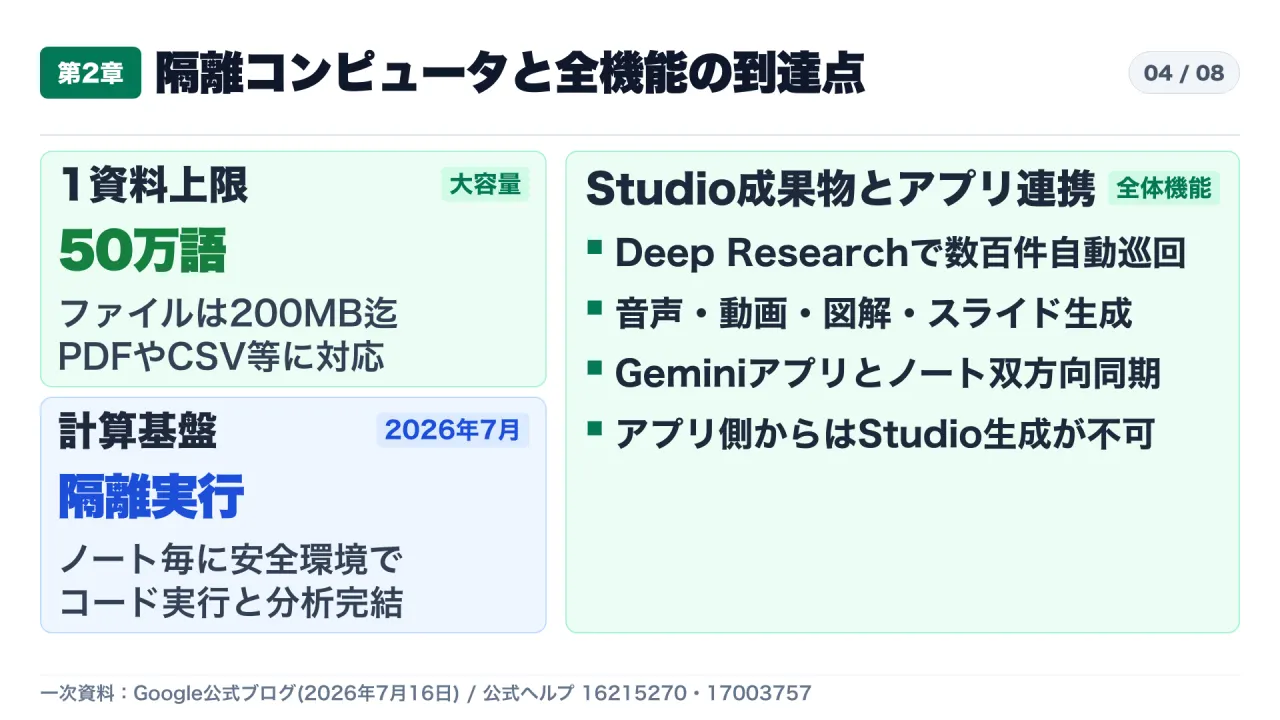
To understand how Interactive Sites fits into the broader architecture, it helps to examine the platform overhaul Google introduced on July 16, 2026, when NotebookLM was rebranded to Gemini Notebook. Alongside the name change, Google provisioned every notebook with what its official blog (notebooklm-gemini-notebook) describes as a “secure cloud computer.”
Rather than relying purely on text retrieval and prompt synthesis, each notebook can write and execute code inside an isolated cloud environment to perform quantitative analysis across uploaded datasets. On the ingestion side, answer/16215270 specifies support for PDF, Microsoft Word (.docx), PowerPoint (.pptx), Markdown, CSV, and related formats up to 500,000 words or 200 MB per individual source across all tiers. For web discovery, the integrated Deep Research capability dispatches autonomous research workflows across up to several hundred websites to compile multi-page reports complete with cited sources and un-cited candidate references.
Within the Studio panel, Interactive Sites sits alongside Audio Overviews, Video Overviews, slide decks, infographics, mind maps, quizzes, and structured reports. Bidirectional synchronization also links Gemini Notebook with the main Gemini Apps interface (answer/17003757): notebook titles and source changes propagate in both directions. However, Google enforces a strict functional boundary across the two surfaces: users cannot trigger Studio artifact generation (such as sites or audio overviews) from inside Gemini Apps, and notebooks originating from Gemini Apps chats appear as read-only when viewed from Gemini Notebook.
4. Five-Hour Compute Quotas and Plan-Tier Capacity Ceilings
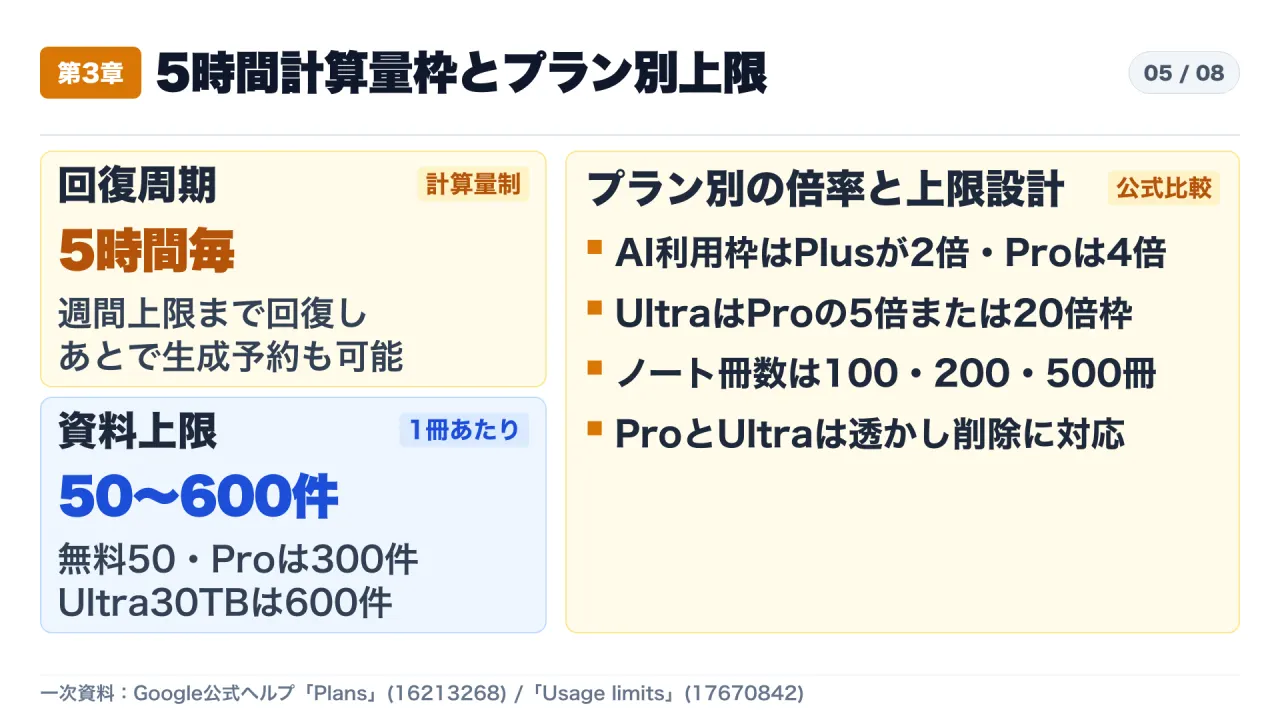
Production adoption also depends on understanding usage throttling and storage limits, detailed in “Learn about Gemini Notebook’s plans” (answer/16213268) and “Manage your Gemini Notebook usage limits” (answer/17670842).
Google has moved away from simple fixed daily message counts toward compute-based allowances that scale with prompt complexity, model selection, conversation length, and Studio feature intensity. Rather than waiting 24 hours for a daily reset, usage capacity replenishes on a 5-hour cycle until an account reaches its weekly ceiling. On the web interface, users who hit an immediate compute limit can queue requests via the “Generate later” option to execute automatically once quota refreshes.
| Plan Dimension | Free Tier (No AI Plan) | Google AI Plus | Google AI Pro | Google AI Ultra (20 TB / 30 TB) |
|---|---|---|---|---|
| Notebooks per User | 100 notebooks | 200 notebooks | 500 notebooks | 500 notebooks |
| Non-Note Sources per Notebook | 50 sources | 100 sources | 300 sources | 500 sources (20 TB) / 600 sources (30 TB) |
| Note Sources per Notebook | 500 notes | 500 notes | 500 notes | 600 notes |
| AI Usage Allowance Multiplier | 1x (baseline) | 2x baseline | 4x baseline | 5x or 20x Pro allowance |
| Watermark Removal | Not supported | Not supported | Supported (with conditions) | Supported (with conditions) |
Notice how capacity scales across two independent axes: structural container limits (how many notebooks and sources a user can store) and dynamic compute multipliers (how quickly heavy operations like Video Overviews, Deep Research, and Interactive Sites consume the 5-hour budget). Think of the 5-hour quota less like an all-you-can-eat daily pass and more like a rechargeable compute passport where complex multi-source builds draw down more charge per run.
At the same time, two commercial details remain unverified in the help specifications themselves: the official plan comparison page (answer/16213268) does not list regional monthly pricing in yen or enterprise volume rate cards, nor does answer/18945748 publish an exact calendar date for mobile app Interactive Sites availability. Organizations budgeting for broad deployment must verify exact pricing inside their Google Workspace admin console or regional billing portal.
5. Consumer Accounts vs. Google Workspace: The 3-Year Human Review Boundary
For corporate security and legal compliance teams, the sharpest risk boundary lies in answer/17004255 (“Privacy and Terms of Use in Gemini Notebook”) and answer/16337734 (“Use Gemini Notebook with a work or school Google account”).
Under consumer Google accounts, uploaded sources and outputs are not used to train foundation models during standard usage. However, clicking the thumbs-up or thumbs-down feedback button fundamentally changes the data-handling path. According to answer/17004255, submitting feedback sends the prompt, uploaded materials, conversation history, and generated outputs to Google for product improvement and machine learning development, where they are decoupled from the user’s account, reviewed by dedicated human reviewers, and retained for up to 3 years.
In contrast, when Gemini Notebook is accessed as a core service under Google Workspace or Google Workspace for Education, uploaded sources, user queries, and model responses are excluded from model training and are never routed to human review—even if a user submits feedback.
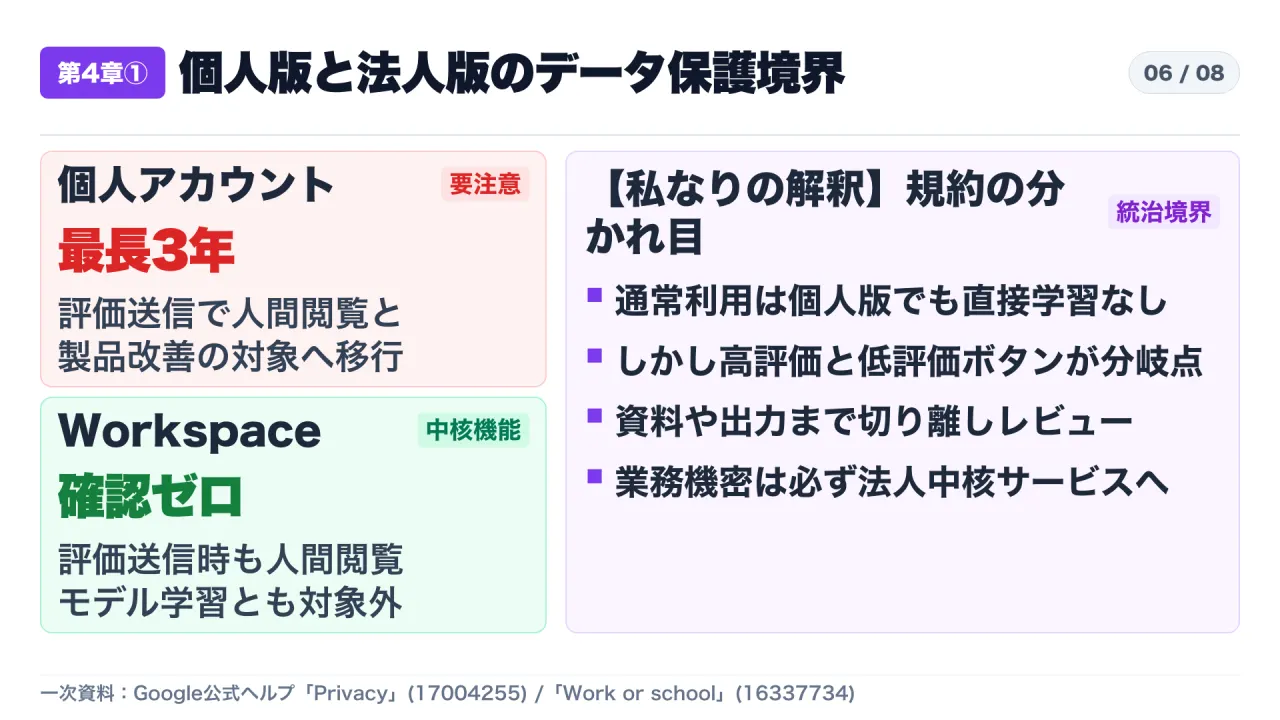
This distinction turns an innocent UI habit—clicking thumbs-down on a flawed dashboard output while testing with an internal spreadsheet on a personal Gmail account—into a multi-year external retention event. Organizations that allow employees to test new features on personal accounts before procuring Workspace licenses face silent leakage of proprietary context through routine feedback clicks.
6. Three Practical Rules for Safe Deployment
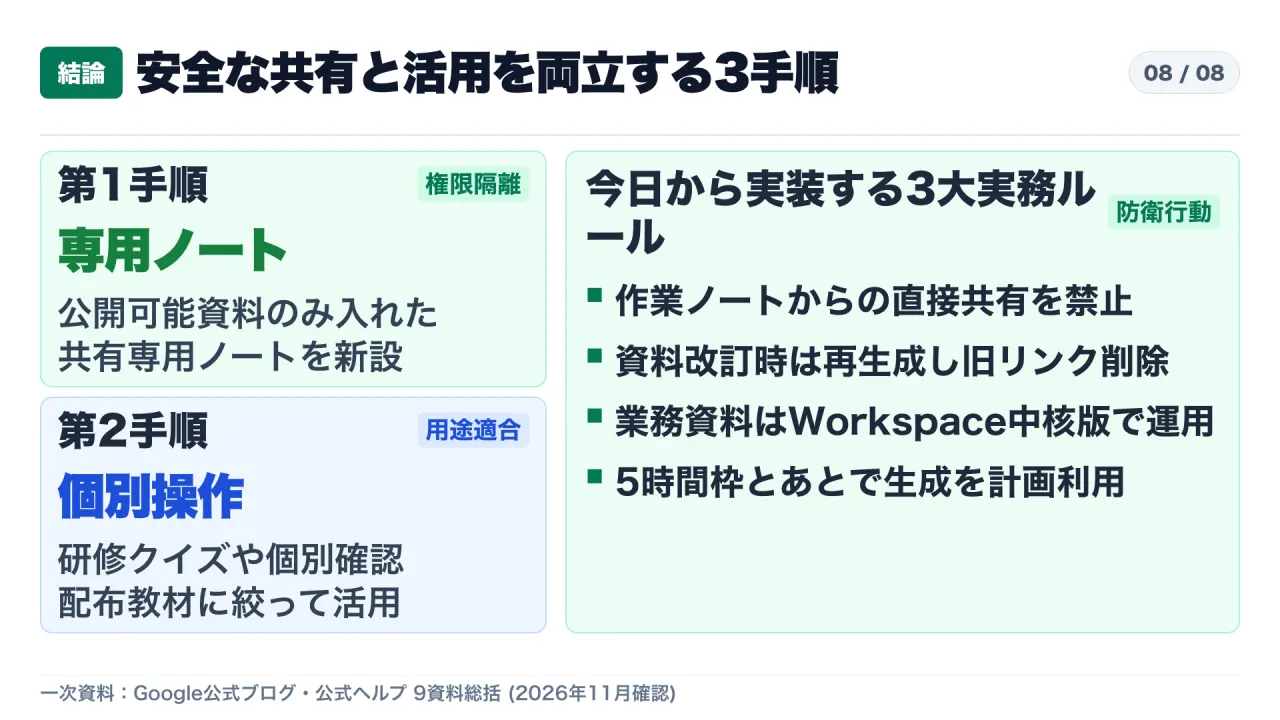
Combining all nine official Google sources yields three concrete operational rules that engineering, product, and compliance teams can enforce immediately:
- Isolate Sharing Notebooks From Working Notebooks: Because Interactive Site links grant access to the entire parent notebook, establish a strict rule prohibiting site generation from working research notebooks. When preparing an external explainer, training page, or interactive checklist, spin up a clean sharing-only notebook containing solely approved, non-confidential sources.
- Design for Per-User Isolation and Static Regeneration: Limit Interactive Sites to self-contained deliverables—such as onboarding self-checks, study quizzes, or read-only executive calculators—where viewers do not need to see one another’s inputs. Whenever source data is revised, regenerate the site manually and disable sharing on outdated links so stale snapshots cannot circulate.
- Mandate Google Workspace Core Services for Business Data: Restrict all internal documents, customer metrics, and proprietary analyses to Google Workspace accounts covered by core-service data protection terms, eliminating the 3-year human-review feedback trap while planning heavy Studio generation around the 5-hour compute reset and “Generate later” queue.
Primary Sources & Official Documentation
- Google Official Blog: “Transform notes, research, and sources into interactive sites with Gemini Notebook.” (November 16, 2026)
- Google Help Center: “Generate sites in Gemini Notebook” (answer/18945748)
- Google Help Center: “Learn about Gemini Notebook’s plans” (answer/16213268)
- Google Help Center: “Manage your Gemini Notebook usage limits” (answer/17670842)
- Google Help Center: “Privacy and Terms of Use in Gemini Notebook” (answer/17004255)
- Google Help Center: “Use Gemini Notebook with a work or school Google account” (answer/16337734)
- Google Help Center: “Add or discover new sources for your notebook” (answer/16215270)
- Google Official Blog: “NotebookLM is now Gemini Notebook” (July 16, 2026)
- Google Help Center: “Notebooks in Gemini Apps” (answer/17003757)